

Yes, you can install a single Ubiquiti or UNV camera yourself if you’re handy. But a full commercial camera system usually needs a pro to work right.
Most business owners we met aren’t short on brains. They’re short on time. Your cameras guard your livelihood every day. One bad angle or dropped feed can cost you real money.
This guide covers both brands, honest local costs, and the common traps. Read on to decide with total confidence.
Can You Install Ubiquiti Cameras Yourself?
Yes, you can install Ubiquiti cameras yourself, but there’s a catch. UniFi Protect software only runs on Ubiquiti hardware. You need a console before the cameras record anything at all.
That console means a Cloud Key, a Dream Machine, or a UniFi NVR. Think of it as the system’s brain. Skip it, and your cameras sit dead. You also need a PoE switch for power. PoE, or Power over Ethernet, sends power and data down one cable.
VLAN settings trip up most beginners next. Cameras must share the same network as the console. Our professional Ubiquiti camera installation team clears these hurdles fast.
Can You Install UNV Cameras Yourself?
Yes, UNV cameras are fairly plug-and-play with a UNV NVR. Plug one into the recorder’s PoE port. The NVR records and stores all your footage. Cameras often come online by themselves. The trouble starts with the settings.
Most recorders add the camera over ONVIF by default. ONVIF gives you live view, but hides smart features you paid for. Switch to the native UNV protocol to unlock people detection and alerts.
Fixed IP addresses also clash on bigger setups, so cameras vanish. For a shop or office, our expert UNV camera installation crew sorts the protocols and subnets cleanly.
DIY Installation vs Hiring a Professional
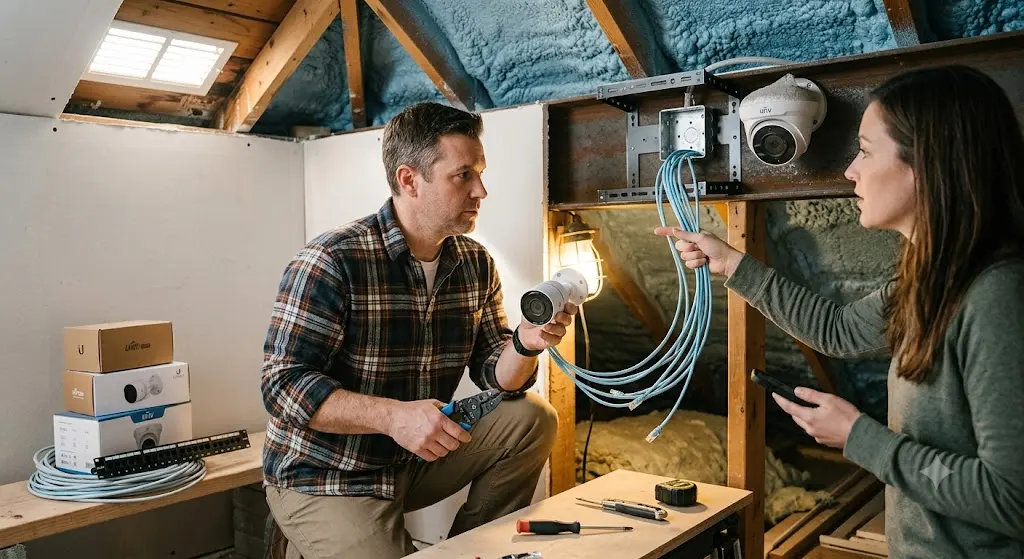
Here’s how the two paths compare, factor by factor.
Upfront Cost
DIY looks cheaper because you buy gear only. A professional quote adds skilled labour. But that fee also covers system design, clean cabling, testing, and a warranty. Cheap kits with monthly cloud fees often cost more across three years. Weigh the full picture, not the sticker.
The table below breaks down typical DIY and professional installation costs across the GTA
| System size | DIY (gear only) | Professional install (GTA) |
| Small, 4 to 8 cameras | ~$1,500 to $3,500 | $3,500 to $7,000 |
| Midsize, 8 to 16 cameras | ~$3,500 to $7,500 | $7,000 to $18,000 |
| Large, 16-plus cameras | ~$7,500 to $16,000 | $18,000 to $50,000 |
DIY prices cover hardware only. They leave out your time, tools, and any redo costs. The professional figures include design, cabling, setup, testing, and warranty.
Read More: How to Secure Your Backyard Against Intruders
Installation Time
A solo install can take days, sometimes several weekends. You mount the cameras, pull the cable, then configure the network after closing.
A trained crew completes most commercial jobs in one to three days. Your business keeps running while we handle the heavy lifting.
Technical Difficulty
This step is where most DIY projects stall. You manage IP addresses, subnets, VLANs, PoE power budgets, and NVR pairing. A single wrong setting drops a camera offline. Professional installers handle these tasks daily, so your system comes online correctly the first time.
Camera Placement
Placement decides whether your footage is useful or useless. Field of view, mounting height, and sun glare all shape the result. Mount a camera too high, and you capture only the tops of heads. We map coverage first, then position each camera to erase blind spots.
Network Configuration
Your cameras run on your business network. That involves IP addressing, camera protocols, bandwidth, and video retention. Set retention too short, and footage disappears before you review it. We configure storage and remote access so your recordings stay safe and reachable.
Cable Routing
Clean cable work is the mark of a proper install. Cat6 runs need conduit, fish tape, and neat concealment. Exposed cable looks untidy and fails sooner. Our commercial network cabling team routes every line out of sight and labels it for future service.
Long-Term Reliability
A camera system is only as valuable as its uptime. Firmware updates, power budgets, and weather sealing all affect its lifespan. A rushed outdoor seal can leak by the first freeze. A professional install runs quietly for years, guarding your property without constant fuss.
Warranty and Support
With DIY, you become your own help desk. When a camera fails, you troubleshoot it alone. A professional install includes a workmanship warranty and direct support. We stand behind every system with a three-year guarantee, so help is one call away.
When DIY Installation Is a Good Idea
DIY works best for small, simple jobs. Think one or two cameras, mounted low, on a network you already run. If the footage is a bonus, not evidence, go for it.
- You need just one or two cameras.
- The mounting spot sits within easy ladder reach.
- You already understand your own network.
- Your ceilings stay low and open.
- No cable has to cross finished walls.
- You want to learn the system hands-on.
- The camera watches a low-risk, quiet area.
- Your budget is tight this quarter.
When You Should Hire a Professional
Hire a pro once the job grows. Several cameras, high ceilings, long cable runs, or critical assets all point to expert help. The stakes climb too high to guess.
- You need full coverage across many zones.
- Ceilings rise higher than about ten feet.
- Cable must travel through walls or conduit.
- You want licence plate or AI analytics.
- Remote monitoring has to work every time.
- The system guards valuable stock or equipment.
- You lack time to troubleshoot networks.
- Clean, hidden cabling matters for your space.
Height is also a safety issue here, not just a hassle. Ontario requires fall protection above three metres. The Canadian Centre for Occupational Health and Safety explains the rule.
That makes high warehouse ceilings a job for trained, insured crews. For a business protecting stock and staff, a complete commercial CCTV installation is peace of mind you can actually see.
“After 14 years and more than 1,600 installs, I see the same pattern,” says Vitaly Sukhina, founder of Sense Group. “One camera is a weekend. A whole building is a profession.”
Common DIY Installation Mistakes
Most DIY problems trace back to six mistakes. Here’s how each one happens, and how to dodge it.
Poor Camera Placement
Many owners mount cameras too high or point them straight into sunlight. Glare and poor angles ruin the footage. Study your property from an intruder’s point of view. Then position each camera to capture clear, identifiable faces.
Incorrect PoE Switch Selection
A weak switch can’t power every camera. Far cameras drop off at random, and you chase ghosts for hours. Pick a PoE switch with enough power budget. Always match it to your full camera count.
Weak Wi-Fi Expectations.
Folks assume wireless cameras will just reach. Across a big floor with metal racking, they won’t. Signals drop, and feeds lag badly. For business coverage, run wired cameras and skip the heartbreak. If patchy Wi-Fi also plagues your floor, well-placed Wi-Fi access points clear the dead zones for good.
Improper Cable Protection
Outdoor cable left bare cracks and leaks. Our winters find every weak spot fast. Use conduit and proper sealing on each run. Skip this step, and next spring brings dead cameras.
Skipping Network Security
Default passwords and old firmware leave cameras wide open. A hijacked feed is worse than no camera. Change every password, and update the firmware. Lock the cameras down before you go live.
Forgetting Future Expansion
People buy a four-port recorder, then want more cameras next year. Now they replace the core. Buy an NVR and switch with room to grow. That small choice saves real money later.
Read More: How Much Should A Commercial Camera Install Cost Per Camera?
How Much Does Professional Camera Installation Cost?

Fair question. Here are real local numbers, not vague guesses. A small system with four to eight cameras runs about $3,500 to $7,000 installed. Eight to sixteen cameras land near $7,000 to $18,000. Larger sites with sixteen-plus cameras reach $18,000 to $50,000. Camera count, ceiling height, and cable distance drive the final price.
A good quote should list every camera, each cable run, and the warranty. Ask for that detail before you sign. For a full breakdown, read our commercial security system cost guide for the GTA.
Break-ins stay a real worry for local businesses too. Toronto police logged thousands of break-and-enter reports last year, according to Toronto Police Service data. Good coverage pays for itself after one bad night.
Questions to Ask Before Deciding
Still on the fence? Run through these five quick questions. Your answers point you toward DIY or a pro faster than any checklist. Be honest with yourself here.
1. How Many Cameras Are You Installing?
One or two cameras suit a careful DIY effort. Six or more usually calls for a professional. More cameras mean more cable, more power draw, and heavier network load.
2. Do You Have Experience With Networking?
You’ll manage IP addresses, subnets, and VLANs yourself. If those terms feel unfamiliar, hire a pro. A misconfigured network stops cameras from recording when you need them.
3. Can You Run Ethernet Cables?
Camera cable often travels through walls and ceilings. Clean runs take fish tape, patience, and practice. Messy or exposed cabling fails faster and looks unprofessional.
4. Do You Need Remote Monitoring?
Most owners want to check footage from their phone. Reliable remote access needs correct network and port settings. We set up secure viewing that works every single time.
5. Is Future Expansion Important?
Planning to add more cameras down the road? Buy an NVR and switch with spare capacity. That one choice saves you from replacing the core system later.
Conclusion
So, can I install Ubiquiti or UNV cameras myself, or do I need a pro? For one simple camera, yes, go for it. For a full commercial system, hire a pro and sleep easy. My advice: match the installer to the stakes. Your footage must work when you need it most. Cameras show you who walked in.
An access control system decides who gets through the door at all. Want a straight answer for your property? Book a free on-site assessment with Sense Group across the Greater Toronto Area today.
Frequently Asked Questions
Are wired security cameras better than wireless for business?
Yes. Wired PoE cameras stay reliable on busy networks. Wireless cameras often drop and lag across large commercial floors.
Which is better for business, Ubiquiti or UNV cameras?
Both are strong. Ubiquiti suits network-driven sites with no monthly fees. UNV offers great value and easy NVR pairing.
How many security cameras does my business need?
It depends on entry points and blind spots. Small shops use four to eight. Warehouses often need sixteen or more.
Can I view my security cameras from my phone?
Yes. Both brands offer mobile apps for remote monitoring. A proper network setup keeps the live feed smooth and secure.
Do PoE cameras need an electrician?
Usually not. PoE cameras run on low-voltage Ethernet, not house wiring. You only need an electrician for electrical changes.