How many Wi-Fi access points do I need is the first question most business owners ask when their office internet starts to lag. You might have a high–speed data plan, but the signal still drops the moment you step into a boardroom.
Most office managers try to fix this by moving their router or adding a cheap signal booster. As soon as you realise that dropped calls are still happening, it becomes clear that a standard access point setup cannot handle a professional workspace.
That is why you need a plan based on your actual floor layout and your specific team size. We know you want a fast connection in every corner without overspending on unnecessary hardware.
In this guide, we will share the exact logic used to plan professional networks. We will cover how to find your coverage baseline and why your total device count matters more than the size of the room. You will also learn how physical obstacles like glass walls change your placement and how to prepare for high-bandwidth video meetings.
Let’s start with the most basic information first.
What Is a Wi-Fi Access Point in a Commercial Office?
An access point (AP) is a dedicated device that bridges your wired network and your wireless devices. A professional AP has one focused job, which is providing a high-capacity wireless connection to a specific area of your building.
These devices are usually mounted on the ceiling and connected back to your main network switch with a physical data cable. This wired backbone is what allows them to provide much faster and more stable speeds than a typical mesh system or a signal extender.
In a modern GTA office, these units also act as a traffic controller for your data. They are designed to handle dozens of simultaneous connections from laptops, smartphones, and tablets without slowing down.
While a standard router might crash when thirty people join a video call, a commercial access point uses advanced internal processors to balance the load and keep the signal strong for everyone.
Why Does Your Office Need Access Points and Not Just a Router?
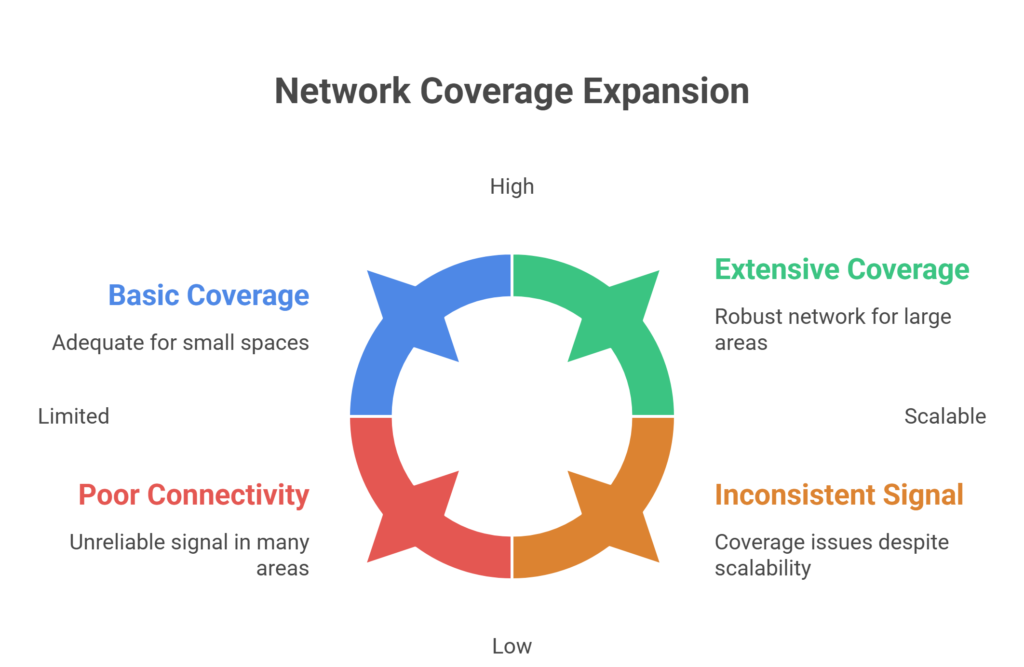
A common mistake many businesses make is trying to run a professional operation on a single high-end router. While a router is great for a small home, it cannot push a signal through the multiple glass walls, concrete pillars, and heavy furniture found in a modern office.
As your team grows, that single device becomes a bottleneck that leads to dropped video calls and frustratingly slow speeds. Using dedicated access points allows you to move the source of the Wi-Fi directly to where your employees are sitting.
Below is a table comparing why a professional office setup requires dedicated access points:
| Feature | Standard Office Router | Enterprise Access Points |
| Coverage Area | Limited to one central spot | Scalable to cover every corner |
| User Capacity | Struggles with 20+ devices | Handles 100+ devices per unit |
| Signal Stability | Drops through walls/glass | Consistent throughout the floor |
| Movement | Connection drops between rooms | Seamless roaming without lag |
| Installation | Sits on a desk or shelf | Clean, ceiling-mounted design |
Relying only on a router means your internet speed gets weaker every time you walk further away from the device. This creates dead zones in boardrooms or private offices where high-speed access is needed most.
By installing multiple access points, you are creating a mesh of connectivity that scales with your business. This setup ensures that your network remains fast and stable, even when your entire team is running high-bandwidth applications at the same time.
It is the only way to provide a professional-grade experience that keeps your staff productive and your data secure across the entire office layout.
For offices that rely on network cabling in Toronto as the backbone of their infrastructure, access points are the wireless layer that sits on top of that wired foundation. Get the foundation right, and the wireless performance follows.
What Drives the Number of Wi-Fi Access Points Your Office Needs?
Calculating the exact number of access points is a balancing act between physical space and digital demand. It is rarely a fixed number because no two office layouts are the same.
Every office has unique invisible factors that can cut a Wi-Fi signal in half. From the thickness of your drywall to the amount of Bluetooth interference from wireless headsets, these details change your hardware requirements. We look at four main drivers to determine the total number of wifi access points needed.
Here is what genuinely drives the number:
Office Size and Floor Plan Shape
A standard open-plan office typically starts at one AP per 1,500 to 2,500 square feet. But floor plan geometry shifts that number.
A clean rectangular layout of 4,000 square feet may need two APs. An L-shaped, U-shaped, or multi-wing floor of the same area may need three or four, because the geometry creates coverage gaps that a straight layout simply would not have.
How Many Devices Will Be on the Network
Every device on your office network is a wireless client. Laptops, mobile phones, tablets, VoIP handsets, printers, smart displays, IP cameras, badge readers, they all count. A solid rule of thumb for enterprise-grade APs is one unit per 25 to 30 active simultaneous users.
Critically, plan for peak load, not average load. Monday morning at 9 AM, when every device signs on at once and everyone opens their calendar, is the real performance test.
What Your Office Walls Are Made Of
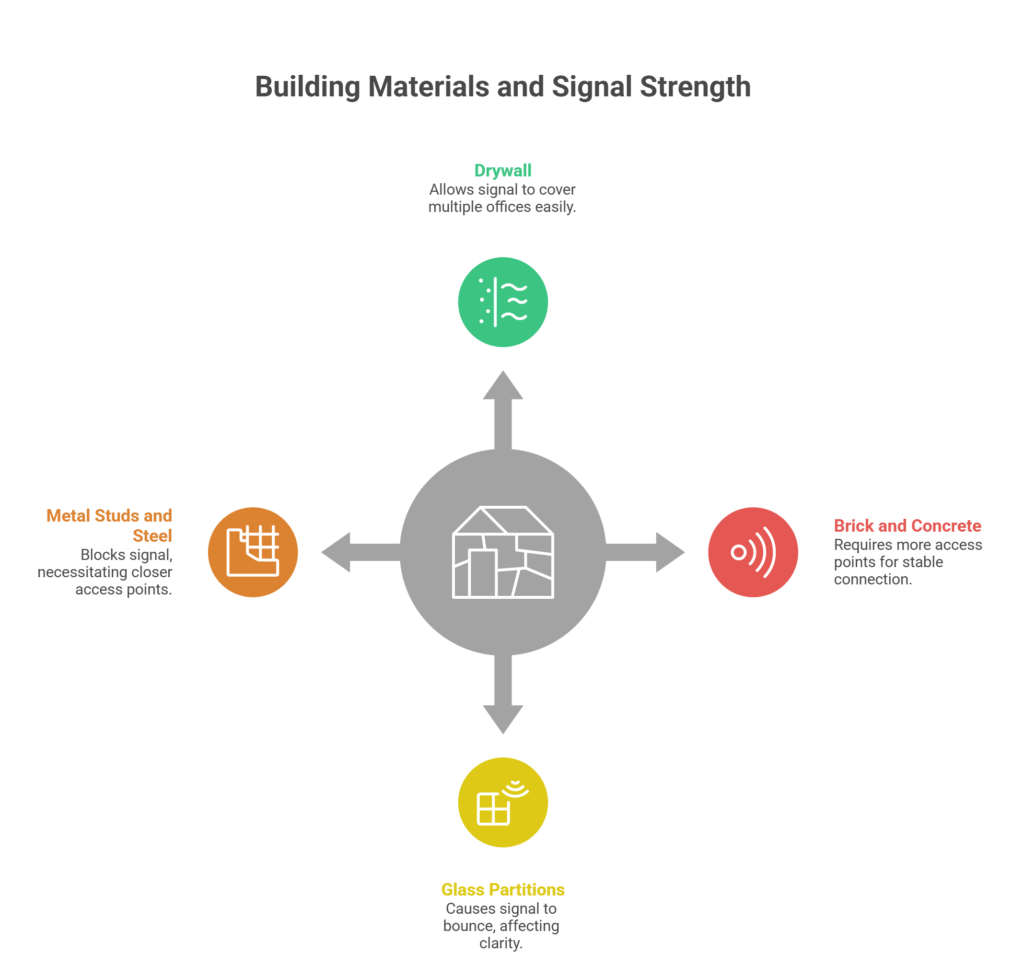
Building materials have a measurable impact on signal strength, and this one catches a lot of businesses off guard.
- Drywall: You can usually cover several offices with one access point if they are separated only by basic drywall.
- Brick and Concrete: If your office has exposed brick or concrete pillars, you will likely need an access point in every major room to maintain a stable connection.
- Glass Partitions: Modern offices use a lot of glass, but this actually causes the signal to bounce rather than pass through cleanly.
- Metal Studs and Steel: If your walls are built with steel framing, the metal acts as a shield that blocks the signal, requiring more access points placed closer together.
More walls and denser materials between your APs and your devices mean a higher AP count.
What Your Team Does on the Network
Not all office WiFi usage is equal. A team that mostly handles email and light browsing has a very different demand profile from a team running back-to-back video calls while pushing large files to cloud storage.
The heavier your applications, the more you need to plan for capacity.
However, the truth is that your office layout and building materials often dictate your actual performance. As soon as you realise that your walls are actively blocking your signal, you can stop guessing and start calculating your hardware needs based on real-world physics.
That is why we focus on the specific variables of your workspace rather than using a one-size-fits-all approach. Well, you now need to determine your baseline number by looking at the specific metrics of your office.
Let’s move into the main calculation framework to find exactly how many Wi-Fi access points do I need by looking at your square footage and device density.
How Many Wi-Fi Access Points Do I Need for My Office
Your internet speed is only as good as the wireless bridge between the wall and your team’s laptops. If you under-calculate your hardware needs, you aren’t just dealing with slow downloads. You are actively losing billable hours to connectivity lag and signal interference.
You have to look at your office as a high-pressure environment where every glass wall and concrete pillar acts as a physical barrier to your profit.
As soon as you realise that thirty people on a simultaneous video call can crash a standard network, the math changes from how much space do I have to how much data can this room hold. It is a delicate balance of radio frequency physics and device density that dictates whether your team stays focused or stays frustrated.
Below is a table to help you calculate your requirements based on the real-world density of a GTA office:
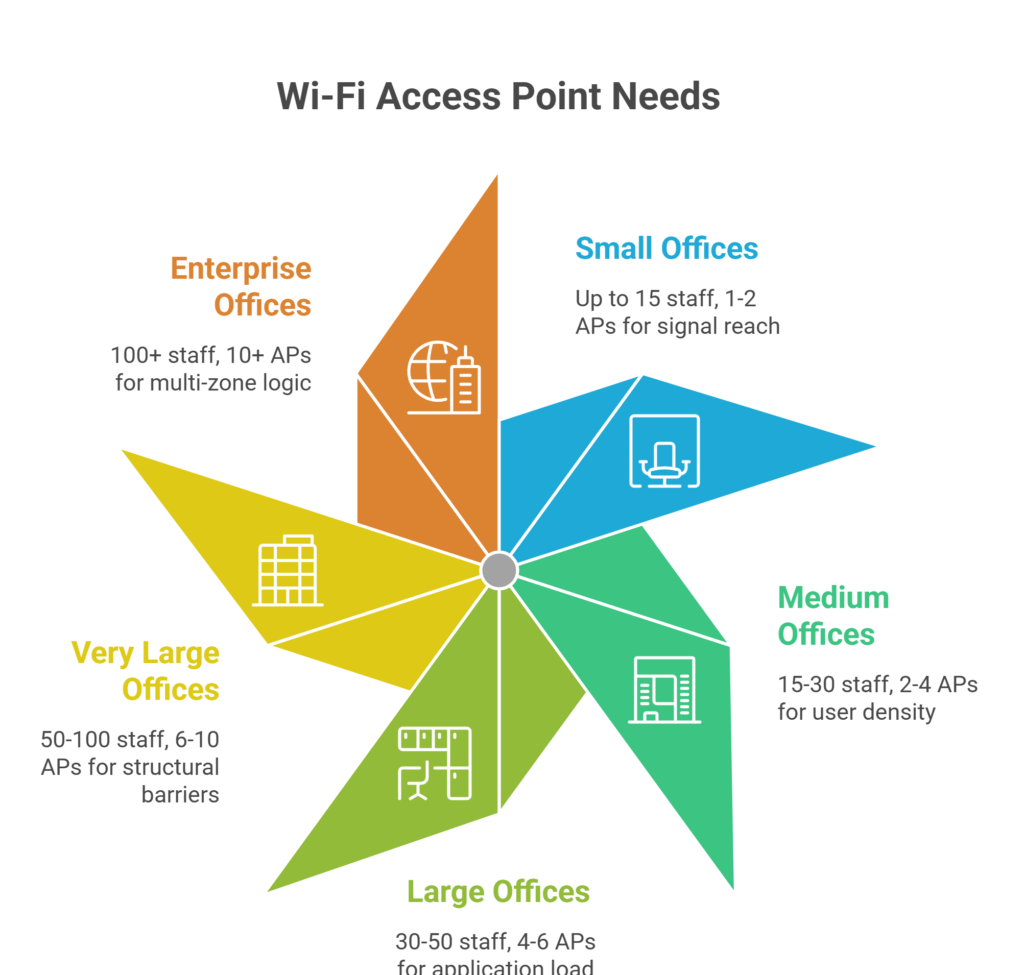
| Office Size | Approx. Staff Count | Recommended APs | Primary Driver |
| Under 1,500 sq ft | Up to 15 staff | 1–2 APs | Signal Reach |
| 1,500–3,000 sq ft | 15–30 staff | 2–4 APs | User Density |
| 3,000–5,000 sq ft | 30–50 staff | 4–6 APs | Application Load |
| 5,000–10,000 sq ft | 50–100 staff | 6–10 APs | Structural Barriers |
| 10,000+ sq ft | 100+ staff | 10+ APs | Multi-Zone Logic |
The logic behind these numbers is a helpful starting point, but they rarely tell the whole story of a specific workspace. Every office in the GTA has its own set of structural challenges and team habits that can change these estimates in an instant.
To help you avoid overspending or ending up with dead zones, we will explain each section in detail. Let’s now look at how placement and device density change your strategy as your floor plan grows:
Small Office Under 1,500 Square Feet
If your office is one open room with fewer than 15 staff and minimal walls, a single well-placed enterprise AP will do the job comfortably. Add a second if there are enclosed rooms, glass partitions, or a separate meeting room that sees regular video call traffic.
Placement matters far more than count at this scale. One AP mounted centrally on the ceiling covers far more effectively than two APs pushed into corners.
Medium Office Between 1,500 and 5,000 Square Feet
This is the most common office size we work with across the GTA. Two to four APs is the typical range for a clean open-plan layout. Add one or two more if there are private offices, enclosed meeting rooms, or a split layout across clearly distinct zones.
One AP per meeting room is standard practice on any properly designed office network.
Spread your APs evenly across the floor. Do not cluster two units close together and leave the far end of the office underserved. Even spacing is the foundation of even coverage.
Large Office Between 5,000 and 10,000 Square Feet
At this scale, capacity is the driving factor more than coverage distance. With 50 to 100 staff, device count during business hours easily reaches 150 to 200 simultaneous connections.
Six to ten APs is the standard starting range for most layouts, with variations depending on floor plan complexity and application load.
Proper network cabling infrastructure at this size also needs careful planning. Each AP requires a dedicated Cat6 or Cat6A cable run back to the network switch, and the switch needs to support the power requirements of the AP spec you choose.
Multi-Floor Corporate Office Building
Multi-floor offices require a floor-by-floor design approach. Never assume that signal bleeding between floors will cover gaps. It will not, and trying to rely on it creates unpredictable coverage and interference between floors.
Use a centralised WLAN controller or a cloud-managed platform like Ubiquiti’s UniFi Network Controller or Cisco Meraki Dashboard to manage all floors from a single interface.
Roaming domains need to be configured so that devices moving between floors reconnect instantly through 802.11r fast roaming rather than dropping and re-authenticating from scratch.
Access point installation in Toronto for multi-floor corporate buildings is one of our more common project types across the GTA. The difference between a deployment that works and one that frustrates your team almost always comes down to roaming configuration and channel planning.
Well, you now need to take these baseline numbers and apply them to your specific floor plan. Whether you are setting up a small boutique office or a multi-floor corporate headquarters, the goal is always the same: invisible, reliable connectivity that just works.
Taking the time to plan your cabling and placement now saves you from expensive troubleshooting down the road.
If you are still unsure about the exact count for your space, a professional site survey is the most practical next step to ensure every corner of your office stays connected.
What Are the Most Common Office Wi-Fi Mistakes Businesses Make?
Over 15 years and more than 1,600 commercial installations, we have seen how office WiFi goes wrong. Rarely is it a hardware problem. Almost always, it is a planning and configuration problem. These are the mistakes we encounter most often, and the ones that cost the most to fix after the fact.
Placing Access Points in the Wrong Spots
One of the most common mistakes we see is placing access points in corners, inside IT closets, or directly above server racks. These spots are often chosen for convenience, but they end up severely limiting your signal.
For the best performance, you should mount the device centrally on the ceiling in an open workspace. This positioning allows the signal to reach across the entire zone it is meant to serve without being blocked by physical barriers.
Skipping Channel Planning
When every AP in your office uses the same Wi-Fi channel, they end up competing for airtime. This creates co-channel interference, which causes slower speeds and unstable connections.
Even if your signal looks strong, the network is essentially fighting itself.
To fix this, you need channel planning. This simply involves assigning non-overlapping channels to adjacent access points. It is a free configuration step that makes a noticeable difference in your daily network performance.
Mixing Enterprise and Consumer Hardware
Trying to use a home router for 40 people won’t work for long. These consumer units simply aren’t built for a heavy business load.
Professional brands like Ubiquiti, Meraki, or Aruba are designed for this environment. They offer much more than just raw speed. You get better stability, easier management, and the ability to grow your network without issues.
No Dedicated AP for Meeting Rooms
A conference room during a video call is one of the most Wi-Fi-intensive environments in any office.
A dedicated AP per meeting room is standard practice on any properly designed commercial office network. It is the difference between a boardroom that works and one that embarrasses you in front of clients.
Building for Today Without Planning for Tomorrow
When the time comes to grow, adding a new unit becomes a simple hardware swap. This is far cheaper than a full retrofit later on. Planning this way ensures your office network is truly scalable.
No VLAN Separation Between Staff and Guest Networks
Guest devices sharing the same network as your internal corporate systems are a security exposure.
VLAN segmentation is a standard configuration step on any enterprise AP deployment. If your current network does not have it, it is worth fixing soon. Pairing your wireless network with a properly configured access control system gives you full oversight of both physical and network access across your premises.
Sense Group Installs Commercial Access Points for Offices Across the GTA
If you look at this guide from top to bottom, you now have a clear answer to how many Wi-Fi access points do I need. You have the numbers, the placement strategy, and the technical rules. But knowing the numbers is only half the battle.
One common mistake we see is having the right plan but the wrong execution. Generally, office managers or owners try to tackle the physical installation themselves or hire a general contractor who doesn’t understand network physics. That means you could still end up with dead zones or interference even with the best hardware in hand.
At Sense Group, we specialise in taking the guesswork out of your connectivity. We handle the heavy lifting to ensure your office network is fast, stable, and ready for growth.
- Professional Site Surveys: We don’t guess. We analyse your floor plan and wall materials to find the perfect mounting spots.
- Structured Cat6 Cabling: Our team handles all the network cabling to ensure your access points have a high-speed, reliable backbone.
- GTA-Wide Expertise: We have performed hundreds of access point installations in Toronto and across the GTA for offices of all sizes.
- Turnkey Configuration: From setting up guest networks to ensuring seamless roaming between floors, we handle the software so you don’t have to.
We serve commercial offices across the Greater Toronto Area and well beyond.
Stop guessing at the number. Book your free site assessment, and we will tell you exactly how many access points your office needs and get them installed properly.
Final Thoughts
A professional network is the backbone of your business operations. Throughout this guide, we’ve covered why square footage is just a starting point and why device density and building materials are the real drivers of your hardware needs.
Avoiding common traps, like using home routers or skipping channel planning, will save you hours of frustration and lost productivity.
The goal is to build a system that stays invisible because it works so well. By planning for your team’s current load and future growth today, you ensure your office remains a productive environment for years to come.
If you’re ready to stop dealing with Wi-Fi lag, reach out to Sense Group for a professional consultation and installation.