Managing several business locations across Toronto isn’t easy. If you run stores in Toronto, Hamilton, Mississauga, Kitchener, or Barrie, you already know the challenge.
You can’t physically be everywhere at the same time. Yet you still need to know what’s happening inside your retail shops, restaurants, warehouses, or construction offices.
When problems like theft, inventory issues, or staff disputes happen, delays in visibility can quickly turn into real losses. That’s why many business owners start searching for how to monitor multiple store locations remotely.
In this guide, you’ll see the practical ways businesses keep an eye on multiple locations from a single dashboard. We’ll walk through the systems that make remote monitoring possible.
You’ll also learn how these technologies work together to give you real-time visibility across every store. By the end, you’ll understand what setup most multi-location businesses use to stay in control without being on-site every day.
Why Monitoring Multiple Store Locations Is Difficult Without the Right System?
Running several locations sounds great in theory. In reality, it quickly exposes a management gap. Once a business expands beyond one site, daily oversight becomes harder to maintain.
Owners cannot physically check every store, warehouse, or restaurant during the day.
Managers report updates, but reports rarely capture everything happening on the floor. Small issues slip through unnoticed until they grow into bigger operational problems.
Without proper multi-location management tools, businesses rely heavily on manual updates and phone calls.
That approach slows decision-making and creates blind spots across operations. Modern companies solve this challenge with remote monitoring and centralized operations.
Below are some common reasons why monitoring multiple locations becomes difficult without the right systems in place:
Lack of real-time visibility
When businesses operate in multiple locations, owners rarely see what is happening in each store throughout the day. Managers may provide updates, but those reports usually come hours later.
Without remote store monitoring, problems often surface only after they affect operations
Inconsistent reporting from managers
Different managers communicate issues differently. One location might report problems immediately, while another may overlook them. This creates gaps in multi-location management and makes it difficult to maintain consistent oversight across every store.
Delayed response to incidents
Security incidents or operational failures rarely wait for a convenient moment. Without centralized monitoring, business owners often learn about theft, disputes, or technical issues too late.
Centralized operations systems help identify problems quickly, so action can be taken sooner.
Inventory discrepancies across locations
Tracking inventory across multiple locations becomes complicated as products move between shelves, storage areas, and different stores. Businesses without inventory monitoring systems often discover stock discrepancies only after they affect sales or supply.
Employee misconduct or policy violation
Occasional policy violations or cash handling mistakes can occur when oversight is limited. Businesses that rely on commercial security camera installation and operational monitoring tools gain better visibility into daily store activity.
Store opening and closing inconsistencies
Opening late, closing early, or failing to secure the premises can create operational and safety risks. Without centralized monitoring systems, these routine issues may go unnoticed across distributed locations.
Many organizations move toward integrated solutions that combine security cameras, operational data, and access tracking into one platform.
A properly configured commercial security camera installation often becomes the foundation of that visibility. This allows managers to observe store activity while operational systems handle reporting. With the right setup, businesses gain control over daily operations without needing to be physically present at every location.
Well, these are only the common reasons businesses struggle with multiple locations. Now, let’s look at the systems before we get into how to monitor multiple store locations remotely.
6 Key Systems That Enable Remote Monitoring of Multiple Locations
Once a business expands beyond one location, visibility becomes harder. A manager might be in Toronto while stores operate in Hamilton, Mississauga, or Barrie. Without the right systems, oversight depends on calls, emails, and end-of-day reports.
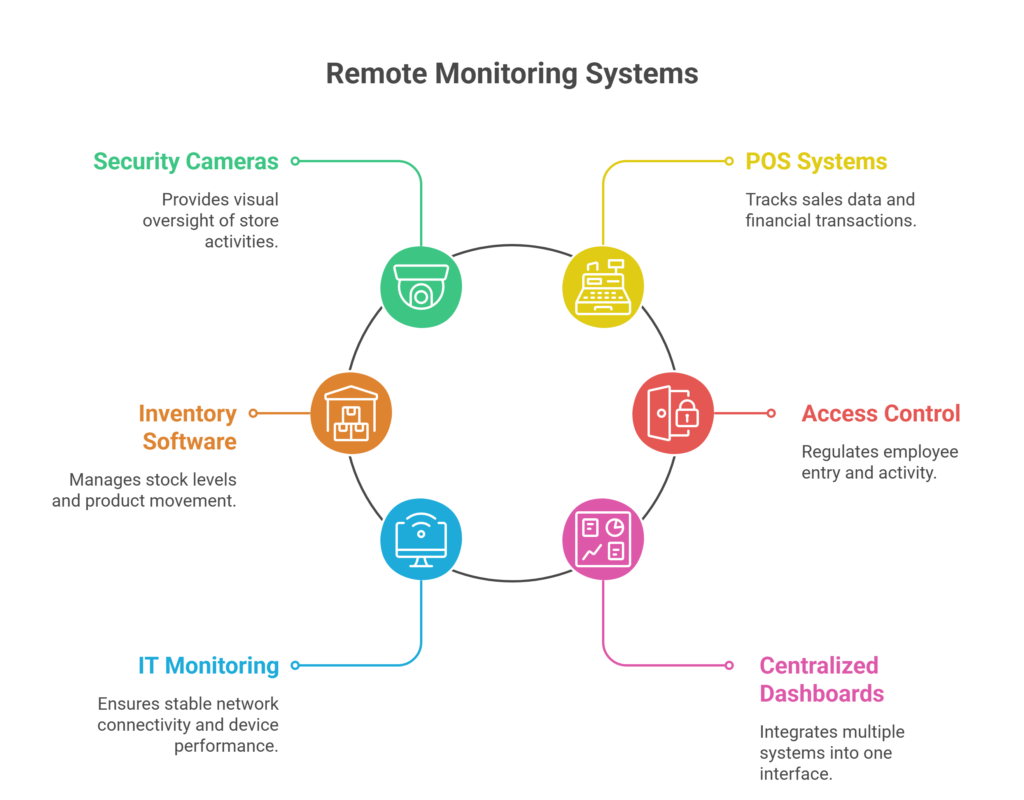
That’s why many companies look for reliable ways of how to monitor multiple store locations remotely. Instead of relying on one tool, modern monitoring setups combine several technologies. Cameras provide visual oversight. POS systems reveal sales activity. Inventory software tracks stock movement. Access systems log staff activity. When these tools connect through a centralized dashboard, owners gain real operational visibility across every location.
Below are the most common methods businesses use to monitor distributed locations.
Method 1: Monitor Stores Using Remote Security Camera Systems
For most businesses, remote monitoring begins with commercial CCTV surveillance. Cameras provide the most direct way to see what is happening inside each location.
Modern IP camera systems for multi-location businesses stream video through secure networks. Each camera connects to a Network Video Recorder (NVR) or cloud video platform that stores footage and organizes feeds by location.
Through mobile apps or web portals, managers can instantly check camera views from any store.
Businesses typically rely on security camera monitoring to:
- Supervise sales floors and entrances
- Monitor stockrooms and loading areas
- Review incidents at checkout counters
- Verify store opening and closing procedures
For example, a retailer based in Toronto can open a monitoring app and check live feeds from stores in Hamilton and Barrie without leaving the office. A properly designed security camera installation for retail chains often becomes the foundation of remote store monitoring.
Method 2: Monitor Sales Across Locations Using POS Systems
While cameras show activity, POS monitoring systems explain the transactions behind that activity.
A multi-location POS dashboard collects sales data from each store and presents it in one reporting interface. Owners can compare performance across locations, review transaction logs, and monitor refund activity without contacting store managers.
This method helps businesses:
- Track daily revenue across locations
- Detect unusual refunds or pricing errors
- Compare sales performance between stores
- Monitor cashier activity and transaction patterns
Retail chains, restaurants, and franchise businesses across Ontario often rely on POS dashboards to maintain financial oversight across distributed locations.
Method 3: Track Inventory Across Locations in Real Time
Inventory monitoring focuses on product movement rather than transactions. Businesses operating multiple locations must constantly track stock levels across stores and warehouses.
A multi-location inventory management system allows managers to view stock levels, product transfers, and reorder alerts from a single dashboard.
Companies use inventory monitoring to:
- Prevent stock shortages at busy locations
- Track product movement between stores
- Detect shrinkage or missing inventory
- Coordinate warehouse and retail inventory levels
For example, if a product sells out in Mississauga, managers can quickly check stock levels in nearby locations such as Toronto or Kitchener and transfer inventory before losing sales.
Method 4: Monitor Employee Access and Store Activity
Access control systems focus on people rather than products. These systems regulate who enters certain areas within a building and record every access event.
Modern remote access control systems for commercial properties use keycards, PIN pads, or biometric scanners to track staff entry.
Businesses use access monitoring to:
- Restrict entry to storage areas or cash rooms
- Monitor staff attendance across locations
- Verify employee access to sensitive areas
- Review access logs during investigations
When access control integrates with security cameras, managers can confirm who entered a location and review video footage at the same time.
Also read: What is Access Control Entry?
Method 5: Monitor Store IT Systems and Networks Remotely
Remote monitoring also applies to the technical infrastructure behind store operations. Cameras, POS systems, and dashboards depend on stable connectivity and functioning devices.
Businesses use remote IT monitoring tools to track:
- POS system uptime
- network connectivity across stores
- device performance and health
- software updates and security alerts
If a system goes offline, administrators receive alerts immediately. This helps prevent downtime that could disrupt sales or security monitoring.
Many businesses across Toronto combine fibre connectivity with Starlink internet installation for business locations when stores operate in rural or hard-to-reach areas.
Method 6: Use Centralized Dashboards for Multi-Location Management
The final method brings everything together. Centralized monitoring dashboards integrate multiple systems into one interface.
These platforms combine:
- Security camera feeds
- POS sales data
- Inventory updates
- Access control logs
- Operational alerts
Instead of switching between different systems, business owners can review everything from one screen.
Retail chains, logistics companies, and franchise networks often rely on centralized monitoring dashboards for multi-location businesses to supervise operations across cities such as Toronto, Hamilton, Mississauga, and Barrie.
These dashboards turn several independent systems into a single operational control center when implemented correctly.
How to Monitor Multiple Store Locations Remotely: Step-by-Step Setup
Once the right systems are available, the setup process is fairly straightforward. Most multi-location businesses follow a practical workflow to build a reliable monitoring environment. Each step adds another layer of visibility across stores, warehouses, or job sites.
When these steps are combined, owners can supervise operations from a single dashboard instead of relying on daily reports.
Below is a simple process businesses use when implementing multi-location remote monitoring systems.
Step One: Assess monitoring needs
Start by identifying what needs monitoring at each location. Some businesses focus on security cameras and theft prevention, while others prioritize inventory tracking or operational reporting.
List the areas that require visibility, including sales counters, storage rooms, entrances, or stock movement. This assessment helps determine the number of cameras, systems, and network requirements for each site.
Step Two: Install security camera systems
The next step is installing cameras across key areas. A professional security camera installation typically includes IP cameras positioned near entrances, payment counters, storage areas, and loading zones. These cameras capture daily activity and provide visual evidence if incidents occur.
Step Three: Set up a centralized NVR or cloud system
Once cameras are installed, they must connect to a recording platform. Businesses usually deploy an NVR (Network Video Recorder) on-site or a cloud-based video management system. This system stores footage, manages camera settings, and allows remote access from mobile or desktop applications.
Step Four: Integrate POS and inventory platforms
Video monitoring becomes more useful when combined with operational data. Businesses often connect multi-location POS systems and inventory management software to their monitoring dashboard. This integration helps managers compare sales activity, stock movement, and store activity in one place.
Step Five: Install access control systems
Access control adds another security layer. Systems such as keycards, PIN entry panels, or biometric readers track staff movement in restricted areas. When integrated with surveillance systems, managers gain better insight into employee access activity.
Step Six: Configure remote viewing apps
After installation, the monitoring system must be accessible remotely. Most platforms provide mobile monitoring apps and secure web portals. Owners and managers can log in from smartphones or desktops to check activity across locations.
Step Seven: Test alerts and monitoring dashboards
Before the system goes live, test every alert and dashboard feature. Motion alerts, camera feeds, and operational data should appear correctly in the monitoring platform. This step confirms that each location is visible and that alerts reach the right users.
When these steps are complete, businesses gain a structured monitoring environment. Owners can observe activity across locations without constant travel between stores. Many organizations combine these tools with centralized business security systems to create a reliable multi-site monitoring setup.
Cloud Monitoring vs Local Systems for Multi-Location Businesses
Businesses usually choose between cloud-based monitoring platforms and local recording systems. Each option offers different advantages depending on the size and structure of the business.
| Feature | Cloud Monitoring Systems | Local NVR Systems |
| Access | Any device via the internet | Local network or VPN |
| Scalability | Easy to add locations | Requires additional hardware |
| Maintenance | Vendor managed | Owner managed |
| Cost structure | Monthly subscription | Higher upfront cost |
| Remote troubleshooting | Easier | Limited |
Cloud systems work well for businesses that operate in many locations or require frequent remote access. They allow camera feeds and operational data to be viewed from any location with internet access.
Local NVR systems are often used when businesses prefer to store video footage on-site. This approach provides direct control over storage and may reduce recurring subscription costs.
However, remote access may require additional network configuration.
Both approaches can support multi-location monitoring systems, and many organizations combine cloud services with local recording for added reliability.
What Are The Benefits of Monitoring Multiple Stores Remotely?
Security camera systems play a central role when businesses want to understand how to monitor multiple store locations remotely. Cameras give owners direct visibility into daily activity across stores, warehouses, and offices. Instead of relying only on reports from staff, managers can quickly check what is happening inside each location.
Modern systems use IP cameras, which transmit video over the network instead of traditional analog cables. These cameras connect to an NVR (Network Video Recorder) that stores and manages video footage. Many businesses now combine this setup with cloud video management systems, which allow footage to be accessed remotely.
Through mobile monitoring apps, owners and managers can view cameras from anywhere.
These systems offer several useful capabilities that help businesses monitor operations more effectively:
- Live video feeds from multiple locations
- Playback recording to review past events
- Motion alerts when unusual activity occurs
- Multi-site viewing from a single interface
- Remote troubleshooting of camera systems
With these tools, owners can monitor stores using several devices. Many managers use smartphone apps to quickly check activity during the day. Others prefer desktop dashboards that display multiple camera feeds at once. Some systems also provide cloud portals, where authorized users can securely access footage and system controls.
For example, a retail owner in Toronto may operate stores across several cities. Using a centralized camera system, the owner can open a monitoring app and instantly check camera feeds from stores in Hamilton and Barrie. If something unusual happens, such as a delivery arriving late or activity near the cash counter, the owner can review the footage without visiting the location.
Some Key Challenges and Limitations of Multi-Location Monitoring
Remote monitoring gives businesses powerful oversight, but it is not completely effortless. Like any operational system, it comes with a few challenges that companies should understand before deployment. Knowing these limitations helps businesses plan better and avoid surprises during implementation.
One of the most common concerns is the initial setup cost of remote monitoring. Installing cameras, wiring networks, and configuring monitoring platforms requires an upfront investment. However, many businesses recover this cost over time through improved security and reduced losses.
Another factor is internet reliability. Remote monitoring depends on stable connectivity. If the network goes offline, camera feeds and dashboards may become temporarily unavailable.
There are also staff privacy considerations. Businesses must follow workplace policies and communicate clearly with employees about surveillance practices.
Finally, system integration can become complex when multiple platforms need to work together. Security cameras, POS systems, access control, and inventory platforms must be configured correctly.
These challenges are usually manageable with proper planning. Most businesses reduce risk by working with experienced installers who design the monitoring system, configure integrations, and test the entire setup before it goes live.
Typical Cost of Multi-Location Monitoring Systems in Toronto
Now, let’s talk about one more important thing for remote monitoring. Yes, that’s the cost.
The cost of setting up a system to monitor multiple store locations remotely can vary quite a bit. Some businesses only need a few cameras and basic remote viewing, while others require a fully integrated monitoring environment that connects security cameras, POS systems, inventory platforms, and centralized dashboards.
Because each business operates differently, costs often scale with the complexity of the monitoring system.
Estimated monitoring system costs in Toronto
| Business Type | Typical Setup | Estimated Cost (CAD) |
| Small retail store (1–2 locations) | 4–8 IP cameras, NVR recording system, mobile viewing app | $2,500 – $6,000 per location |
| Medium franchise or restaurant chain | 8–16 cameras, cloud monitoring platform, POS integration | $6,000 – $15,000 per location |
| Warehouse or logistics facility | 16–40 cameras, access control systems, centralized monitoring dashboard | $15,000 – $40,000+ depending on coverage |
These ranges include equipment, installation, and basic system configuration. Ongoing cloud storage or monitoring software may add monthly costs depending on the platform used.
Although the upfront cost can seem significant, most businesses view remote monitoring as a long-term operational investment. Systems that provide real-time visibility across locations help reduce internal theft, detect operational issues earlier, and improve day-to-day oversight.
For many Toronto businesses, the biggest value comes from preventing losses and avoiding disruptions across multiple locations. Once the monitoring infrastructure is in place, owners gain a reliable way to supervise operations without constantly traveling between stores.
Well, now, as you know how to monitor multiple store locations remotely from anywhere, let’s learn about one more important thing below.
Choosing the Right Monitoring Setup for Your Business
Every business has different monitoring needs. A small retail shop may only require a few cameras and a basic dashboard, while a franchise network might need a fully integrated monitoring platform.
Several factors should guide the decision.
- Number of business locations
- Size of each facility
- Level of security risk
- Reliability of internet connectivity
- Available budget for infrastructure
It is also important to consider future expansion. A monitoring system should be able to scale as new locations open.
This is where professional system design becomes valuable. Experienced technicians evaluate the site, recommend the correct equipment, and design a monitoring architecture that supports both current operations and future growth.
Professional Installation for Multi-Location Monitoring in Toronto
Installing a multi-location monitoring system requires more than simply mounting cameras. The entire infrastructure must work together reliably, along with cameras, network connections, recording systems, and monitoring dashboards.
Businesses across Toronto, Hamilton, Kitchener, Barrie, and Mississauga rely on professional installation services to build these systems properly.
At Sense Group, we specialize in designing and installing monitoring solutions for businesses across Toronto. Our team handles everything from security camera systems and access control to network cabling and Starlink connectivity. We focus on building reliable monitoring environments that help businesses supervise multiple locations without operational complexity.
For companies managing several stores, warehouses, or facilities, the goal is simple: make remote monitoring easy, reliable, and scalable. That is exactly what our installation team works to deliver.
Final Thoughts
Managing multiple locations used to mean constant travel between stores, phone calls with managers, and delayed updates about daily operations. Today, technology has changed that. With the right systems in place, business owners can see what is happening across every location without leaving their office.
However, this is the end of today’s guide on how to monitor multiple store locations remotely.
The key is choosing a setup that fits your business. Every store, warehouse, or job site has different monitoring needs. A well-designed system allows you to respond quickly to problems, maintain accountability across teams, and keep operations running smoothly.
For businesses in Toronto, remote monitoring is no longer a luxury. It has become an essential part of managing modern multi-location operations efficiently.