

Construction companies running active job sites in Ontario have dealt with connectivity problems for years, and Starlink for construction sites in Ontario has become one of the most discussed solutions among site supervisors, project managers, and field IT teams.
Not because it is flawless, but because it works where everything else fails or takes too long to set up.
Our team at Sense Group has installed Starlink on commercial sites across the GTA and surrounding regions, and this guide covers exactly what works, what does not, and how to get the most out of it on an active Ontario build.
What Is Starlink Business and How Is It Different?
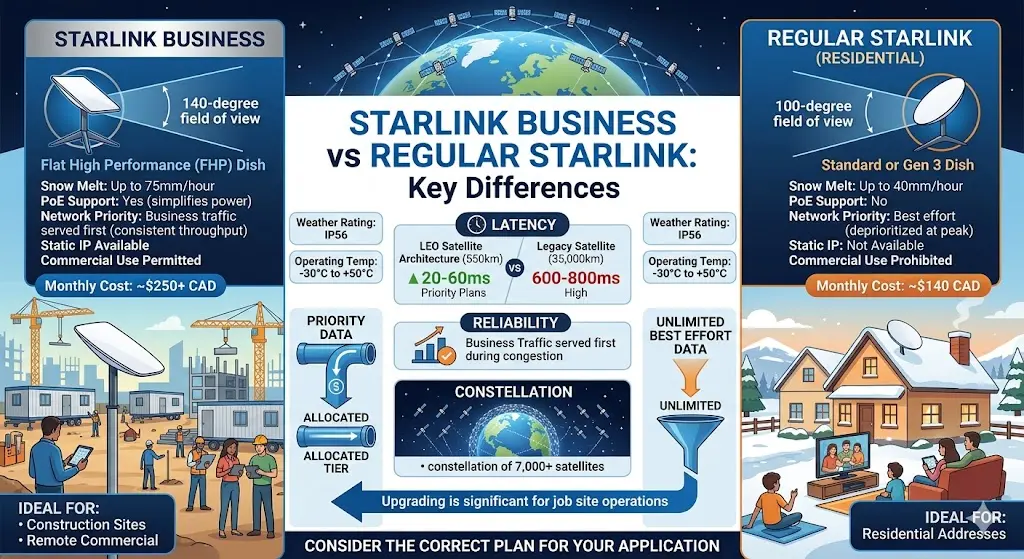
Starlink is not one single product. SpaceX offers different tiers for different users, and the gap between the standard consumer plan. The commercial Business plan is significant enough that choosing the wrong one on a job site creates real problems from day one.
At the core, Starlink runs a constellation of over 7,000 satellites in Low Earth Orbit (LEO) at roughly 550 kilometres above Earth. Legacy satellite services used geostationary (GEO) satellites orbiting at around 35,000 kilometres, which is why they produced 600 to 800 milliseconds of latency and could not support video calls.
Starlink’s LEO architecture brings latency down to 20 to 60 milliseconds on Priority plans, putting it in the same range as a solid broadband connection.
What separates the Business plan from the standard version goes beyond just speed numbers. Here is a direct comparison:
| Feature | Starlink Business | Regular Starlink (Residential) |
| Hardware | Flat High Performance (FHP) dish | Standard or Gen 3 dish |
| Field of view | 140 degrees | 100 degrees |
| Snow melt rate | Up to 75mm per hour | Up to 40mm per hour |
| Weather rating | IP56 | IP56 |
| Operating temperature | -30°C to +50°C | -30°C to +50°C |
| PoE support | Yes | No |
| Network priority | Business traffic served first | Best effort, deprioritized at peak |
| Data type | Priority Data (allocated tiers) | Best effort, unlimited |
| Static IP available | Yes, add-on available | Not available |
| Commercial use permitted | Yes | No, personal use only |
| Monthly cost (approx. CAD) | $250 and above | $140 |
| Ideal for | Construction sites, remote commercial | Residential addresses |
The standard Residential plan explicitly prohibits commercial use under Starlink’s terms of service. Beyond the policy issue, the hardware itself is the bigger practical difference. The FHP dish’s 140-degree field of view gives it better satellite lock in environments where partial sky obstructions are common, such as an active construction site with cranes and rising structures.
The PoE support simplifies the power infrastructure inside a site trailer considerably.
On a Business Priority plan, your site’s traffic moves ahead of standard users during congestion. For a job site running cloud project management, video calls, and security camera feeds at the same time, that consistent throughput is what keeps operations running instead of stalling. For a deeper background on how Starlink works as a technology, our post on what is Starlink internet covers it clearly.
Why Ontario Construction Sites Cannot Rely on LTE or Fibre
If you have run a job site anywhere in Muskoka, Parry Sound, or north of Barrie, you already know this problem. The LTE signal that looked fine on a coverage map is not what you get in the field.
Ontario has some of the busiest commercia construction activity in the country, and a large number of those sites fall in areas where broadband simply does not reach. Contractors, site supers, and project managers deal with this every week. It slows down projects, creates reporting gaps, and puts site security at risk.
No Signal in the Areas Where You Are Building
Many active construction zones across Ontario fall outside any usable cellular coverage. Regions like Kawartha Lakes, Caledon, Huntsville, and parts of Muskoka have sites where LTE either does not exist or drops to one bar.
LTE Gets Overloaded When a Full Crew Shows Up
Even when a tower is nearby, it was not built to handle 30 to 40 people connecting from the same location at once. When every crew member hotspots from that same tower, the bandwidth per person drops fast.
Fibre Takes Too Long for a Temporary Site
A fibre or fixed wireless pull to a greenfield site in rural Ontario takes four to twelve weeks in most cases. That window depends on the provider, the location, and what infrastructure already sits nearby.
Construction projects cannot wait. Permits need filing on week one. RFIs and submittals go out every single day. Waiting three months for an internet connection is simply not a realistic plan.
Starlink fills this gap directly. It does not rely on a cell tower, and it does not need weeks of setup before it works.
A site in Caledon or Kawartha Lakes can be online the same day the dish goes up. For teams that need reliable internet from the very first day of a project, that kind of deployment speed makes a real difference.
Does Starlink For Construction Sites in Ontario Work?
So, the part you were waiting for is here, as yes, it works. For the large majority of Ontario job sites, particularly those outside the urban core, Starlink on a commercial Priority plan works reliably across a full operational workday. Here is the honest, detailed breakdown.
Speed and latency on Priority plans:
Download speeds on Local Priority plans run between 135 and 310 Mbps. Upload sits between 10 and 22 Mbps. Latency lands in the 20 to 60 millisecond range. Those numbers translate directly into real-world performance that handles a commercial site’s full workload simultaneously.
Where Ontario geography matters:
On job sites in Barrie, Orillia, Muskoka, Parry Sound, Kawartha Lakes, and rural Caledon, the results are meaningfully different from what you get in the GTA. In those regions, LTE either does not reach the site or buckles under the crew’s combined data demand within the first hour of the workday. Starlink does neither.
Winter performance on active Ontario sites:
ICI construction in Ontario runs year-round. A Muskoka infrastructure project does not stop in January, and neither should your internet connection.
The FHP dish’s built-in heating element melts snow accumulation at up to 75mm per hour and operates reliably down to -30°C. In our experience across Ontario winter deployments, including a detailed case we documented in tested by winter, proven by time, the dish requires no manual intervention in cold weather. It runs, and it keeps running.
What Ontario construction sites are actively running over Starlink:
- Cloud project management platforms, including Procore, Autodesk Build, and Buildertrend, for real-time submittals, RFIs, daily site logs, and permit documentation
- IP security cameras connected to an on-site NVR for local recording, with remote monitoring access configured through a static IP address. See how this works specifically in our guide on Starlink video surveillance
- IP-based access control systems in Toronto for card reader and key fob entry management at secured site access points, managed remotely by the project owner or security team
- VoIP phone systems in site offices, replacing the reliance on cellular-only communication in areas with poor signal
- Video conferencing with general contractors, engineers, consultants, and project owners across multiple concurrent meetings
- Heavy equipment, GPS telematics and IoT sensor monitoring
- Drone footage upload from site documentation and progress reporting flights
Ultimately, Starlink is not fibre. On builds where contractual uptime SLAs are required, such as hospital construction or data centre builds with strict technology protocols, fibre remains the standard.
Starlink fills the gap where fibre is unavailable, not yet pulled, or where the project timeline makes waiting impractical. It performs best when paired with cellular failover through Peplink SpeedFusion.
That combination gives you near-100% uptime, and the automatic failover is invisible to users on site.
How Starlink Gets the Signal to Your Job Site
Most people picture old satellite internet when they hear the word satellite connection. Slow speeds, high lag, and a dish pointed at one fixed spot in the sky. Starlink works nothing like that.
The technology behind it is different in a fundamental way, and a basic grasp of how it works helps you set it up correctly on a commercial site. This section covers how the signal travels from the sky to your job site trailer, and what the network around the dish needs to look like to perform reliably.
The Dish Has No Moving Parts
The Flat High Performance dish is an electronic phased array antenna. There is no motor inside it, no physical rotation, and no mechanical tilting. The dish uses software to steer its beam electronically across the sky. This makes it faster, more reliable in rough outdoor conditions, and much easier to mount on a site trailer or elevated pole without worrying about mechanical wear over a long project.
Satellites Pass Overhead, and the Dish Follows Them
Starlink has over 7,000 satellites orbiting at roughly 550 kilometres above Earth. Legacy satellite systems sat at around 35,000 kilometres, which is why they produced 600 to 800 milliseconds of latency.
The FHP dish tracks satellites as they pass overhead, switching between them automatically. Each switch takes under 200 milliseconds. Most applications running on a job site do not register the transition at all.
Your Data Travels a Specific Path
When a site manager uploads permit drawings to Procore, the data leaves the dish, reaches a satellite overhead, moves across the constellation through inter-satellite laser links, and hits a ground station before connecting to the internet.
The full round trip happens in 20 to 60 milliseconds on a Priority plan. That is fast enough for VoIP calls, live video conferencing, and real-time access to cloud platforms.
Obstructions Affect Performance More Than Weather Does
When total obstruction climbs above 3 per cent, connection quality drops noticeably. A proper site survey before installation picks the mounting position based on where the build is headed, not just what the sky looks like on day one.
The Included Starlink Router Is Not Enough for a Commercial Site
The default router that ships with the dish has limited LAN ports and no support for cellular backup or multi-WAN traffic management. On a site with 20 to 30 connected devices across multiple trailers, it is not built for that load.
The signal path itself is straightforward. What separates a stable commercial setup from a frustrating one is not the dish. It is the network built around it.
A well-chosen installation position gives a Starlink connection the foundation it needs to run a real job site from the first day through to the last.
Our network cabling Toronto team handles this as part of the full installation, running cable cleanly between connected devices with proper labelling and documentation.
What Can You Run on a Starlink-Connected Job Site?
A properly configured Starlink setup on an Ontario construction site handles far more than most teams expect the first time they use it. Here is a practical breakdown of what runs well, and what needs some planning around it.
Runs without issue:
- Procore, Autodesk Build, Buildertrend: Real-time access, submittals, RFIs, punch lists, drawing reviews, and daily logs
- Microsoft Teams and Zoom: Multiple concurrent video calls across different trailers
- VoIP phone systems: latency sits well within the 150ms threshold for acceptable call quality
- IP camera feeds to on-site NVR: Local recording over the internal network; remote access through static IP
- Access control system management: Card readers, biometric scanners, and key fob systems over IP work cleanly with a static IP configured
- GPS telematics and IoT devices: Low-bandwidth devices that connect and stay connected
- General crew Wi-Fi: Social media, messaging, light browsing; keep this on a separate VLAN so it does not affect business-critical traffic
Runs with planning:
- BIM model syncing and large drawing package uploads: The 10 to 22 Mbps upload ceiling is the constraint here; schedule large transfers during off-peak hours, such as overnight or at lunch, rather than mid-morning when the whole site is active
- 4K multi-stream camera feeds: Feasible, but data-intensive; size your Priority Data tier accordingly and configure the NVR to record locally rather than pushing full-resolution streams over the satellite connection constantly
- Drone video upload (raw footage): Works, but large RAW files benefit from the same off-peak scheduling approach as BIM files
Requires specific configuration:
- NVR remote access: Requires static IP add-on to bypass CGNAT; without it, inbound connections to the NVR will not work
- VPN tunnels to head office: Requires a static IP; standard CGNAT blocks inbound tunnel establishment
- IP-based access control with cloud management: Works cleanly once a static IP is active, and the access control platform is configured accordingly
The Limitations of Starlink For Construction Sites You Need to Know Before Committing
Every experienced installer will tell you the same thing: Starlink on a construction site works well when set up correctly, and creates problems when it is not. Here is what to plan around before the dish goes up.
The Starlink app includes an Obstruction Simulator that lets you preview sky coverage from any mounting position before committing to it.
A site running 15 IP cameras, 25 users on cloud software, and regular video calls can burn through a 1TB plan faster than expected. Size your data tier based on actual concurrent usage, not an estimate of what you think you might need. The table below gives a practical guide:
| Site Type | Concurrent Users | IP Cameras | Recommended Monthly Tier |
| Small site, 1 trailer | 5 to 10 | 2 to 4 | 1TB Local Priority |
| Mid-size site, 2 to 3 trailers | 15 to 25 | 6 to 10 | 2TB Local Priority |
| Large site, 4+ trailers | 30+ | 10+ | 2 to 5TB Local Priority |
Standard Starlink Business uses CGNAT, which means the network assigns a shared private IP address rather than a public one. Any application that requires inbound connections, including NVR remote access, VPN tunnels, and cloud-managed access control, will not work without the static IP add-on.
The FHP dish draws 110 to 150 watts continuously. On a generator-powered site, this needs to be in the load calculation from the start.
It is a small draw relative to most site equipment, but overlooking it creates an unnecessary problem on sites with tightly managed generator capacity.
How Sense Group Installs Starlink on Ontario Construction Sites
We are Sense Group, a GTA-based commercial technology installation company. We have been installing Starlink on active Ontario construction sites and integrating it with security cameras, access control, and structured networking infrastructure.
Our process on a job site:
Site assessment before anything goes up. We use the Starlink app Obstruction Simulator alongside a physical site walkthrough to evaluate sky clearance from multiple mounting positions.
Hardware specification based on actual usage. We size the FHP dish, Priority Data tier, Peplink router, PoE switch, and access point coverage based on how many users, cameras, and applications the site will actually run simultaneously.
Professional mounting. Depending on the obstruction environment, we mount on the site trailer roof, an elevated pole, or a telescoping mast positioned at the site perimeter for the best northern sky view.
Full network configuration. Then, we configure Peplink SpeedFusion bonding, LTE failover, VLAN segmentation for security versus general traffic, and static IP for NVR and access control.
System integration and commissioning. IP cameras, NVRs, and access control systems in the GTA are all connected, tested, and handed over with a site walkthrough before we leave.
We serve Toronto, Barrie, Hamilton, Kitchener, Guelph, Orillia, Muskoka, Parry Sound, Huntsville, Caledon, Milton, Kawartha Lakes, Peterborough, and surrounding Ontario regions.
Contact Sense Group for a commercial Starlink installation quote
Final Thoughts
Starlink for construction sites in Ontario has moved well past the let’s test it and see stage. It is an operational tool that site managers, general contractors, and IT teams across the province are depending on daily for project management, security monitoring, access control, and crew communications on active builds.
The question is no longer whether it works. The question is whether your setup is built correctly for a commercial environment.
Get the Flat High Performance dish, use a Priority Data plan sized to your actual usage, add the static IP from day one, and put a Peplink router behind it. That combination handles what an Ontario construction site actually demands.
If you found this guide helpful, share it with your team and check our other resources.