Knowing how to design a security camera system for a warehouse matters more than simply installing a few cameras.
Many warehouse owners start planning surveillance without fully understanding how movement, shelving height, dock activity, and blind spots affect visibility. Others focus on equipment first and layout second. That’s backwards.
This guide is here to fix that.
Today, we’ll walk through the step-by-step process of designing a security camera system for a warehouse, including how to plan a practical warehouse camera layout, build a reliable warehouse camera setup, and approach security camera system design the way experienced security system experts actually do.
What Are the Benefits of a Warehouse Security Camera System?
Warehouse managers usually do not question the value of cameras. Inventory moves through many hands every day. Forklifts travel between racks and loading docks throughout each shift. Problems appear from time to time. Someone eventually needs to know what really happened.
A clear camera system gives that answer.
Strong warehouse surveillance shows the real flow of work across the building. Managers can review activity instead of guessing. Video records also help when questions arise about shipments, handling, or workplace incidents.
Instead of repeating obvious selling points, it helps to look at the practical CCTV benefits that warehouse teams depend on every day.
Reduced inventory theft
Visible cameras discourage internal theft and outside intrusion. Video footage also provides evidence when inventory questions appear.
Better employee accountability
Supervisors can review procedures and confirm timelines. Clear footage removes uncertainty during workplace disputes.
Incident documentation
Camera recordings help explain damaged goods, loading mistakes, or shipping errors during busy operations.
Improved safety monitoring
Managers can review forklift movement and aisle congestion. These observations help identify risks and improve safety practices.
Reliable surveillance supports better warehouse management. Managers gain clear visibility across daily activity. Decisions rely on evidence rather than assumptions. Operations become easier to monitor and control.
How To Assess Security Risks Before Designing a Warehouse Camera System?
A camera system should never start with equipment choices. The first step is understanding where risk exists inside the building. Warehouses operate through constant movement. Pallets travel across racks. Forklifts cross traffic lanes.
Trucks arrive and depart through loading docks. Each activity creates areas where incidents may occur.
This stage is called a warehouse surveillance risk assessment.
Here, the goal is simple. Identify locations where visibility matters most before planning camera placement. When risk zones are clear, designing warehouse security camera coverage becomes far easier.
Many facilities approach this step while planning broader commercial video surveillance systems that support operations across the building.
Key Risk Zones in Warehouses
Loading docks and trailer bays: Dock activity often involves high-value goods, truck movement, and frequent handling.
Receiving and shipping stations: These areas experience constant product movement and require reliable documentation.
High-value inventory racks: Certain racks contain products that attract theft or require careful tracking.
Employee access points: Entry doors and internal checkpoints show who enters restricted areas.
Exterior yards and parking areas: Outdoor spaces often involve vehicle activity and shipment staging.
Clear risk mapping simplifies system planning. Once these zones are identified, designers can estimate camera coverage requirements. The process determines how many cameras are needed and where they should be placed.
This planning step ensures the final warehouse security systems design captures the areas that truly matter.
What Areas Must Be Covered in a Warehouse Camera Layout?
After risk zones are identified, the next step focuses on physical coverage inside the building. Warehouses rarely follow simple floor plans. Long storage aisles, cross aisles, staging areas, and dock lines create complex visibility challenges.
A thoughtful warehouse camera layout planning process studies how these spaces connect and where cameras should monitor activity.
Designers usually follow a structured warehouse CCTV camera placement strategy to prevent blind spots. The goal is not to cover every square foot equally. Instead, coverage focuses on operational movement and important decision points inside the facility.
A practical warehouse camera layout works alongside guidance found in a detailed camera placement guide to determine how cameras should monitor key areas.
Critical Warehouse Surveillance Zones
Aisles between pallet racks
Long aisles require camera coverage that can observe movement along storage rows.
Loading dock doors
Cameras document truck activity and loading operations at each dock.
Packaging and sorting areas
Workstations where goods are prepared for shipment often require clear monitoring.
Inventory staging zones
Temporary storage locations benefit from surveillance that records product movement.
Building entrances and exits
Entry points help track employee and visitor movement through the facility.
A structured coverage plan produces a balanced warehouse camera setup. Cameras observe the areas where activity happens most often. Blind spots become easier to avoid. The final system captures meaningful footage rather than random angles across the building.
What Is the Best Security Camera System for Warehouse Environments?
Warehouse environments demand more than basic cameras mounted on walls. Large facilities stretch across wide floor areas, often with high ceilings, long aisles, and busy loading docks.
Standard systems struggle to capture useful footage in these conditions. A modern warehouse, therefore, benefits from IP-based surveillance technology that delivers clearer images and flexible monitoring.
Well-designed warehouse CCTV systems rely heavily on IP cameras connected through reliable network infrastructure. These cameras transmit high-resolution footage directly to centralized recorders.
Moreover, PoE cameras simplify installation because power and data travel through a single network cable.
Plus, centralized monitoring allows supervisors to review activity across multiple areas without moving between locations.
Many warehouse operators also combine their surveillance systems with retail surveillance camera technologies that support large-scale monitoring environments.
That is why learning how to design a security camera system for a warehouse requires choosing camera types that match the building layout and operational activity.
Before selecting equipment, it helps to understand the key features that make industrial warehouse surveillance cameras effective in demanding environments.
| Features | Purpose |
High-resolution sensors | Identify people, equipment, and inventory movement clearly |
| Wide field of view | Cover long aisles and large open areas |
| Night vision capability | Maintain visibility in low lighting conditions |
| Motion detection alerts | Detect unusual activity or unexpected movement |
| Remote monitoring access | Allow managers to review cameras from different locations |
High-resolution imaging, stable connectivity, and reliable recording create the foundation for effective monitoring.
In large logistics facilities, the equipment selected directly influences how successful the overall security camera system design becomes.
How to Design a Security Camera System for a Warehouse: Step-by-Step
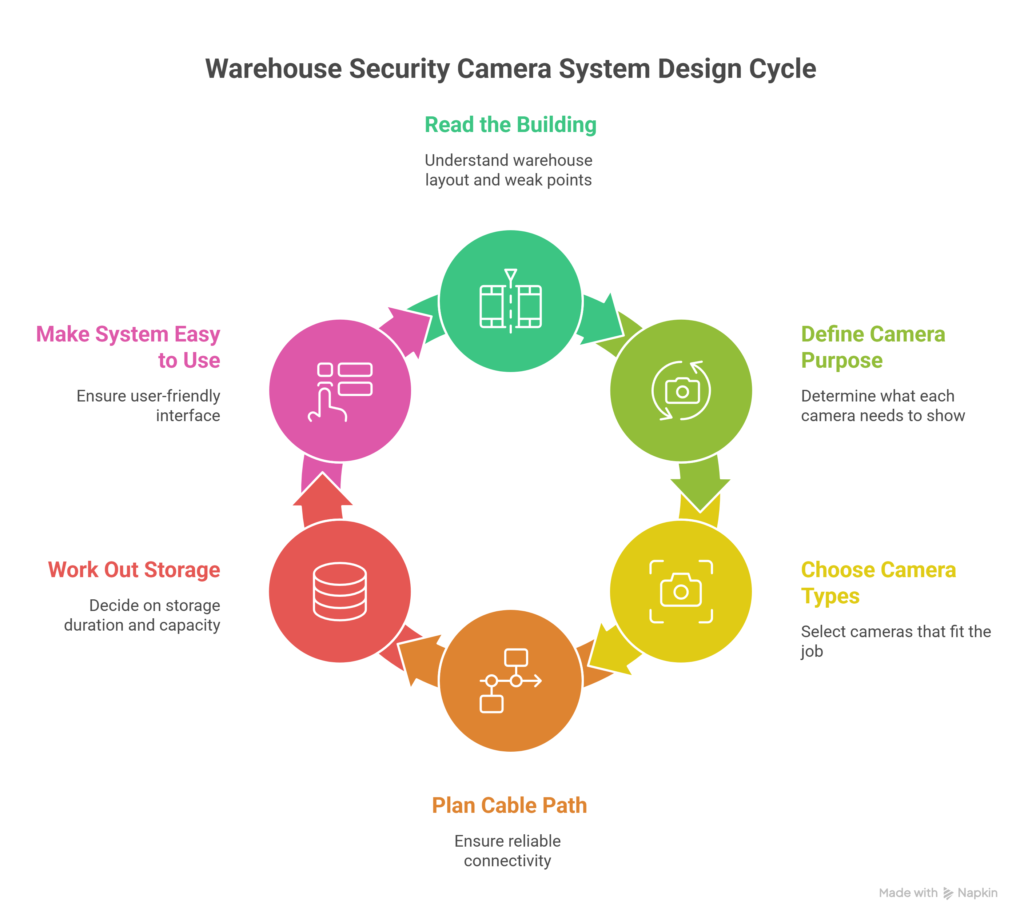
Most warehouse camera systems go wrong for a simple reason. People buy equipment before they understand the building. A few cameras are placed near the doors. Another one gets pointed down an aisle.
The layout looks fine on paper. Then something happens, and the footage misses the part that matters.
You do not fix that problem with better hardware alone. You fix it with planning. A warehouse has its own rhythm, its own traffic, and its own weak points. A proper security camera system design process starts there.
If you want a warehouse camera setup planning method that actually works, you need to look at the building the way the cameras will see it.
That same approach helps before any warehouse camera installation begins, whether you handle it in-house or bring in Toronto camera installation support.
Step 1: Read the building before you read the camera specs
Your warehouse already tells you where cameras matter. You can see it in the forklift routes, the dock activity, the packing stations, and the racks where high-value goods sit. That is your starting point.
A lot of people skip this part because it feels slow. It is not slow. It saves you from wasting money later. You need to know where people stop, where goods change hands, and where sightlines break.
Pay close attention to these areas:
- Loading docks and trailer bays where goods move fast
- Long aisles where racks block natural visibility
- Packing and sorting stations where mistakes often happen
- Entry doors and restricted zones where access matters
This is the point where your CCTV system design starts taking shape. You are not choosing cameras yet. You are deciding what deserves to be seen.
Step 2: Decide what each camera needs to prove
Not every camera has the same job. That is where many weak systems fall apart. One camera may need to show who entered a door. Another may need to show what happened to a pallet. Another may only need to show traffic flow through a wide area.
You should ask a simple question for each zone. If something goes wrong here, what would I need the footage to show? That question changes everything.
In some places, you need detail. In other places, you need broad coverage. If you treat every area the same way, the system becomes expensive and less useful at the same time.
This step also helps you avoid a common mistake. Many cameras end up watching empty floor space because nobody has defined the purpose of the view. Good warehouse security systems do not just record activity. They record the right activity.
Step 3: Choose camera types that fit the job
Now you can talk about equipment. This part gets easier once the layout and camera purpose are clear. You are no longer guessing. You are matching the camera to the job.
Most warehouses use IP cameras because they give you sharper video and more control across larger spaces. A fixed camera may work well for a long aisle. A wider lens may make more sense above a staging area.
Outdoor zones usually need cameras that can handle weather, dust, and changing light.
You do not need the most expensive option everywhere. You need the right tool in the right place. That is the difference between buying cameras and building a real security camera system design.
A few common examples help here:
- Fixed cameras for straight aisle coverage
- Wider view cameras for open work zones
- Outdoor units for yards and parking areas
If you choose cameras before defining the job, you will almost always pay for that later.
Step 4: Plan the cable path before installation day
A camera only helps you if it stays online. That is why cabling matters so much in a warehouse. Long runs, high ceilings, metal racks, and busy work areas all create challenges that smaller buildings do not have.
Most large systems use PoE cameras because one cable carries both power and data. That keeps the setup cleaner and easier to manage. Still, the cable path needs real planning.
You need to know where the runs begin, where they end, and how they stay protected inside an active building.
This is where data cabling becomes important. Clean cable routes reduce service problems later.
A proper Ethernet wiring service also makes future upgrades much easier. If you ever add more cameras, you do not want to start from scratch.
You should think about cable planning early, not after camera locations are chosen.
Step 5: Work out storage before the system goes live
Storage sounds boring until you need footage that no longer exists. Then it becomes the most important part of the system.
Every camera adds to your recording load. Resolution matters. Recording hours matters. Retention time matters. A warehouse with several cameras running every day will fill storage faster than many people expect.
You need to decide how long the footage should stay available. Some warehouses only need short retention. Others need several weeks because claims, disputes, and internal reviews take time.
This step should answer practical questions:
- How many cameras will record at once?
- How clear does the footage need to be?
- How many days should the footage be stored?
If you leave storage for later, the system may start deleting useful footage before anyone notices.
Step 6: Make the system easy to use after it is installed
A camera system can be technically correct and still be frustrating to use. That happens when nobody thinks about the people who will review the footage.
You need a simple plan for live viewing, playback, and access control. Supervisors may need to watch certain areas during active shifts. Managers may need recorded footage when a shipment problem comes up. Some users may only need access to one part of the building.
This part should feel practical, not fancy. If the system is hard to search, hard to access, or hard to understand, people stop using it properly. That defeats the point of having the cameras in the first place.
A good setup gives you answers quickly. It should help you review an incident without wasting time jumping between screens or guessing where the video might be.
However, the full process of how to design a security camera system for a warehouse is not complicated once you see it clearly. You read the building first and then define what each camera must show.
After then you make the system easy to use. That is how you build a warehouse camera system that holds up when something actually goes wrong.
What Infrastructure Supports a Warehouse Security Camera System?
Cameras alone never make a reliable surveillance system. Every camera depends on the network behind it. If that network fails, the cameras stop recording, or the footage becomes unstable.
Many warehouse owners focus on the camera models but overlook the infrastructure that keeps everything running.
A dependable system needs a solid warehouse surveillance system networking from the start. Video travels across cables, switches, and recorders before it ever reaches a monitor.
That entire path must stay stable day and night. Large facilities often rely on professional structured data cabling and organized local area networking to keep connections reliable across long distances.
Strong network infrastructure for warehouse CCTV ensures cameras deliver consistent footage without interruptions.
A warehouse surveillance network usually includes several key components working together:
- Network Video Recorder (NVR): This device stores video footage and allows managers to search and review recordings.
- PoE network switches: These switches power cameras and transmit video data across the network.
- Cat6 Ethernet cabling: High-quality network cables carry video signals across the warehouse.
- Storage drives and RAID arrays: These drives store large amounts of footage and protect recordings from data loss.
- Monitoring workstation: This computer allows supervisors to view live cameras and search past recordings.
- Network rack equipment: Organized racks hold network switches, recorders, and cabling connections.
Strong surveillance infrastructure keeps every camera connected and recording without interruption. A reliable PoE network also makes system maintenance easier when cameras expand across large buildings.
A stable network foundation supports the entire surveillance system. Cameras capture the footage, but the infrastructure protects it. When the network remains stable, recordings stay clear and accessible whenever incidents occur.
Weak infrastructure often leads to dropped connections, missing footage, and unreliable monitoring. Solid planning at this stage keeps the entire system dependable for daily warehouse operations.
We are not done yet, guiding you on how to design a security camera system for a warehouse.
5 Common Mistakes You Should Avoid When Designing Warehouse Surveillance in GTA
Many warehouse surveillance systems look good during installation but fail during real incidents. The reason usually comes back to poor planning. Cameras get mounted quickly without thinking about how they will capture activity inside the building.
A rushed design often creates blind spots or weak coverage. The system may record hours of footage, but still miss the moment that matters. Careful planning helps avoid these problems.
A proper design considers the camera viewing range of each device and calculates the correct number of cameras needed for the building.
Below are several common warehouse CCTV design mistakes that often appear in large facilities.
Common Security Camera Design Mistakes
Cameras mounted too high: Extremely high placement often reduces useful detail and makes identification difficult.
Insufficient aisle coverage: Long storage aisles require careful camera positioning to avoid blind spots.
Ignoring lighting conditions: Poor lighting can make footage unusable if cameras cannot adjust properly.
Poor network capacity planning: Weak networks may struggle to transmit high-resolution video from many cameras.
Inadequate recording storage: Limited storage may delete important footage before anyone has time to review it.
Avoiding these surveillance errors improves the reliability of the entire system. Careful design creates stronger coverage and clearer footage across the warehouse.
When cameras are placed correctly and infrastructure is properly planned, the system becomes far more useful during investigations or operational reviews. Long-term reliability depends on thoughtful planning rather than rushed installation decisions.
So, you must now be clear about how to design a security camera system for a warehouse. But there are still a lot of things to know, and cost is one of them.
How Much Does Warehouse Camera Installation Cost in Toronto?
The final warehouse camera installation cost Toronto businesses see usually depends on building size, camera coverage, and the infrastructure required to support the system.
Network wiring, camera resolution, and recording storage also affect the total CCTV installation price. Some facilities also combine surveillance with access control systems, which adds additional equipment and planning.
Below are the main factors that influence warehouse CCTV installation cost for the GTA:
| Factor | Impact |
| Warehouse size | Larger buildings require more cameras to cover aisles, docks, and entry points |
| Camera resolution | Higher resolution cameras increase equipment and storage requirements |
| Cabling complexity | Longer cable routes require additional labor and infrastructure |
| Storage capacity | Larger recording systems increase the size and cost of NVR equipment |
Careful planning often controls installation costs better than simply choosing cheaper equipment. A well-designed system avoids unnecessary cameras and prevents expensive redesigns later.
Professional planning helps match the system to the building layout, which keeps the warehouse camera installation efficient while still delivering reliable coverage.
Who Designs and Installs Warehouse Security Camera Systems in the GTA?
You do not hire a warehouse camera company just to hang cameras. You hire a team that can read the building, understand the risk, and build a system that fits the way your operation runs.
That is what we do at Sense Group.
We work on warehouse security camera installation in Ontario and the GTA for facilities that need more than a basic setup.
Some warehouses need clear dock coverage. Others need stronger aisle visibility, better yard monitoring, or cleaner network planning across a large building. We handle the full job, so you are not left juggling installers, cabling crews, and system setup on your own.
What you get from us is simple. You get one team that plans, installs, and finishes the system properly.
Why businesses choose Sense Group:
You get a system built around your workflow
We plan camera placement around your docks, aisles, racks, access points, and work zones. That means the system fits your building instead of forcing your building to fit the system.
One company is handling the whole project
We manage the cameras, recording setup, network routes, and installation work together. That saves you time and removes the usual back and forth between different contractors.
You get better visibility where it matters most
A warehouse does not need random camera angles. You need clear views of movement, handoff points, and high-value areas. That is where our commercial CCTV installation for warehouses approach makes a real difference.
Get a cleaner installation
Good camera systems depend on good infrastructure. We take care of the layout behind the walls and above the ceiling, not just the devices you can see.
Room to grow later
Your warehouse may expand. Your camera system should not hold you back when that happens. We design warehouse CCTV installations in Toronto projects with future changes in mind.
Practical advice
We do not throw equipment at the problem and hope for the best. We help you make clear decisions about coverage, storage, and layout before the install begins.
A lot of companies can sell cameras. Fewer can deliver a complete warehouse surveillance system installation in the GTA that makes sense on day one and still makes sense later. That difference matters when the building is large, the inventory is valuable, and the footage needs to be there when you need it.
If you want a warehouse system that is planned properly, installed cleanly, and built for real daily use, Sense Group is the team you call.
Final Thoughts
Warehouse surveillance works best when the system reflects how the building actually operates.
And now, you know everything about how to design a security camera system.
Camera placement, network infrastructure, and storage capacity all work together to create a dependable monitoring system. Careful planning reduces blind spots, improves operational visibility, and protects valuable inventory.
When the design process is done correctly, the system becomes more than security equipment. It becomes a reliable tool that helps managers understand daily operations, investigate incidents, and maintain safer working conditions throughout the warehouse.