Cloud vs on premise access control is a critical decision for Ontario businesses planning a new security system or upgrading an existing one. Whether you manage a condo in Toronto, operate a warehouse in Mississauga, or oversee an office in Vaughan, the hosting model you choose affects cost, security, IT responsibility, and long-term flexibility.
Cloud systems store data online and allow remote management through a secure dashboard. On-premises systems store data on a local server inside your building and are managed internally. Each model offers different advantages depending on your building type, internal IT capacity, and operational needs.
In this comparison guide, we break down the real differences between cloud and on-premises access control so you can make a clear, informed decision for your commercial property in Ontario.
What Is Cloud Based Access Control?
A cloud based access control system in Ontario is a door security system that stores its software and data on secure online servers instead of inside your building. The access control panels and door readers are installed on site, but management happens through a secure web dashboard hosted in the cloud.
How Does It Work for Commercial Buildings?
Property managers or business owners can log in from a phone, tablet, or browser to manage doors, users, and permissions. There is no local server to maintain. The system connects through the internet to update user credentials and record activity.
With cloud access control for multi-location business operations, administrators can:
- Add or remove users remotely
- Unlock or lock doors from anywhere
- View real-time access logs
- Receive alerts for denied entry attempts
- Issue mobile credentials to smartphones
Most modern cloud systems also store encrypted data and provide automatic software updates.
Common commercial brands in this space include Brivo, Avigilon Alta, Verkada, and Kisi. These platforms are popular because they simplify management and reduce the need for internal IT support.
In Toronto condo buildings (M5V, M2N), cloud systems allow property managers to onboard residents, issue fobs, and manage visitor access without being physically on site. Retail chains operating across the GTA use cloud dashboards to control multiple stores from one central account.
Cloud access control works best where remote management, multi-site oversight, and simplified maintenance are priorities.
Now, let’s learn about On-promise access control.
What Is On Premise Access Control?
An on-premises access control system for warehouses or commercial buildings stores its software and database on a physical server located inside the facility. This is also called a local server access control system in Ontario.
How Does It Work in Office and Warehouse Settings?
In this setup, door controllers communicate with a server over the building’s local network. All user data, credentials, and access logs are stored on that internal server.
The system:
- Works primarily on the local network
- Does not depend on constant internet access
- Is managed by internal IT staff
- Requires manual software updates
- Does not include monthly cloud subscription fees
Because the server is physically located on site, the business maintains direct control over its database and infrastructure.
Common on-premises access control brands include HID Global, Honeywell, Genetec, and LenelS2. These systems are often chosen by larger organizations with dedicated IT departments.
In Mississauga warehouses (L5T, L4W), on-premises systems are common because industrial facilities often prefer local network reliability and direct server control. Vaughan industrial buildings (L4K) with internal IT teams may also select this model to maintain full ownership of their data and system management.
On-premises access control works best for organizations that have strong internal IT resources and prefer a capital investment model without recurring cloud subscription fees.
What Are the Key Differences Between Cloud and On-Premise Access Control?
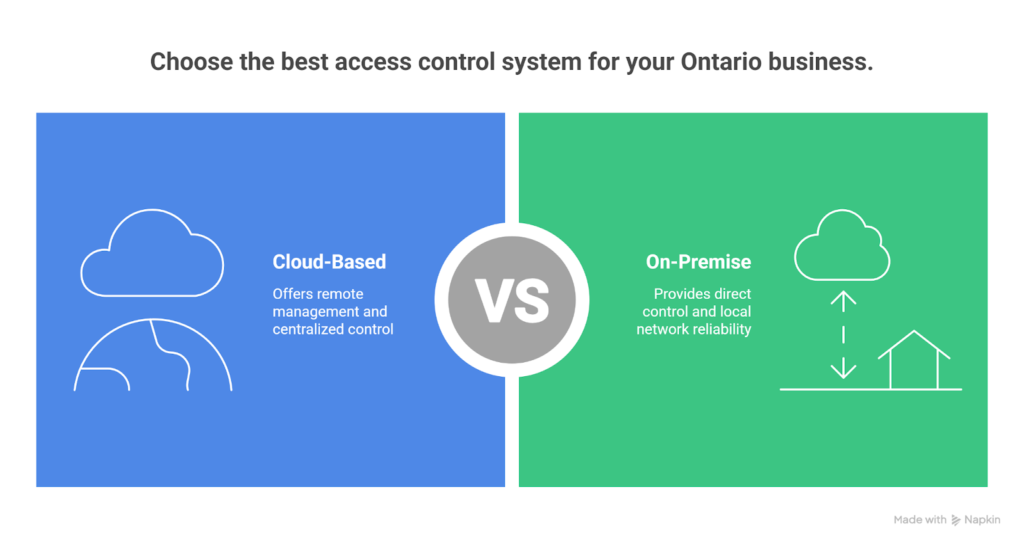
The difference between cloud and on premise access control comes down to where the “brain” of the system lives and who is responsible for running it day to day. Both options can use the same door readers, credentials, and door hardware. The big shift is how the system is managed, where access logs are stored, how updates happen, and how easy it is to run multiple buildings.
For Ontario commercial properties, this matters a lot. A Toronto condo corporation managing residents and contractors has different needs than a Mississauga warehouse running 24-hour shifts. A Vaughan office may have an IT team. A Brampton logistics hub may not want any surprises during downtime.
If you want a full model breakdown, this ties closely to access control system installation in Toronto, and it also affects how well your setup can connect with security cameras installation in Toronto for an audit trail, plus video review.
Side-by-Side Comparison Table:
| Comparison Point | Cloud-Based Access Control | On-Premise Access Control |
| Where data is stored | Stored in a secure cloud data centre, access logs and user database are hosted online | Stored on a local server inside the building, logs and database stay on site |
| Who manages updates | The vendor typically handles software updates automatically | Internal IT or the vendor must update the software manually |
| Internet dependency | The Internet is needed for remote management and cloud sync. Many systems still allow door controllers to keep working with cached permissions | Can run fully on the local network. The Internet is optional unless remote access is needed |
| Remote access ability | Built-in remote access through phone or browser login | Remote access usually needs a VPN or a special network setup |
| Upfront cost | Often lower upfront because no on-site server is required | Higher upfront because server hardware and setup are required |
| Monthly fees | Commonly subscription-based with monthly or annual licensing per door or per site | Usually no monthly cloud subscription, but support contracts may apply |
| IT responsibility | Lower internal IT workload. Vendor handles much of the platform maintenance | Higher internal IT workload for server health, backups, patching, and security hardening |
| Multi-location management | Strong advantage. One dashboard can manage multiple Ontario sites easily | Possible, but more complex. Often requires linking multiple servers or advanced network planning |
Cloud-based access control is often chosen by Toronto condo management teams and multi-location retail operators across the GTA because it supports remote onboarding, fast credential changes, and centralized control.
It fits well when the priority is convenience, speed, and managing multiple properties without relying on on-site IT staff.
On-premises access control is often preferred in Mississauga warehouses, Vaughan industrial buildings, and larger facilities that already have internal IT support and want direct control of the server and database. It can also be a practical fit where local network reliability is the priority and subscription pricing is not desired.
If you tell me the most common property type you want to target first (condos, warehouses, or offices), I can tune this comparison even tighter without adding fluff or stuffing.
Which Is More Secure: Cloud vs On Premise Access Control?
When businesses ask “is cloud access control secure?” or “is on premise access control safer?”, they are usually trying to understand risk, not features. Security is not determined only by where the server sits. It depends on encryption, configuration, monitoring, and who is responsible for protecting the system.
There is no automatic winner. The safer option depends on how the system is deployed and managed. Below are some key takeaways:
Data Encryption
Both cloud and on-premises access control systems can use strong encryption standards such as AES-256 to protect credential data and communication between door controllers and servers.
In a properly configured system:
- User credentials are encrypted
- Access logs are encrypted
- Communication between readers and controllers is secured
If encryption is enabled and maintained correctly, both models can meet commercial security standards in Ontario.
Server Security
In cloud systems, the server is hosted in secure data centres. These facilities often include:
- 24/7 monitoring
- Physical access control
- Redundant power systems
- Network firewalls
- Regular security testing
In on-premises systems, the server sits inside the building. Security depends on:
- Physical server room protection
- Internal firewall configuration
- Patch management
- Backup routines
A well-managed internal IT team can secure an on-site server effectively. However, if updates are delayed or firewalls are misconfigured, risk increases.
Cyber Attack Risk
Cloud systems are connected to the internet by design. This increases exposure, but reputable vendors invest heavily in cybersecurity, threat detection, and regular security audits.
On-premises systems reduce direct internet exposure if not publicly accessible. However, they are still vulnerable to:
- Internal network breaches
- Ransomware attacks
- Outdated software vulnerabilities
In Ontario commercial environments, the real risk often comes from poor maintenance rather than the hosting model.
Vendor Security vs Internal IT Responsibility
With cloud access control, much of the security responsibility shifts to the vendor. They handle:
- Software updates
- Security patches
- Server monitoring
- Data centre protection
With on-premises access control, responsibility falls on internal IT teams or contracted providers. This includes:
- Regular updates
- Firewall management
- Database backups
- Cybersecurity monitoring
If a business has limited IT capacity, cloud systems may reduce operational risk. If a company has a strong IT department, on-premises systems can be managed securely in-house.
Who Controls the Data?
Data control is a key concern for regulated industries in Ontario.
Cloud systems store data in remote servers, but the business retains ownership under service agreements. It is important to review:
- Data storage location
- Data access rights
- Backup policies
- Contract terms
On-premises systems store data locally, giving direct physical control over the database. However, control does not automatically equal stronger security. It depends on how the system is protected.
Regulated Industries in Ontario
Medical clinics in Hamilton, financial offices in Markham, and cannabis retailers in Scarborough often require strong audit trails and encrypted credential management.
Both cloud and on-premises systems can meet compliance requirements if properly configured. What matters most is:
- Strong encryption
- Controlled user permissions
- Regular system updates
- Secure integration with CCTV and alarm systems
Security Summary
Cloud access control is not automatically less secure. And, On-premises access control is not automatically safer.
Security depends on configuration, maintenance, encryption standards, and how seriously the organization manages risk. The better question is not “which is safer?” but “which model fits our IT capacity, compliance needs, and operational structure?”
Cloud and on-premises access control systems can both meet high commercial security standards when properly configured. The real difference lies in who manages updates, who monitors risk, and how consistently the system is maintained.
Ontario businesses must evaluate internal IT capability, compliance obligations, and long-term operational plans before deciding. A well-managed system, whether cloud-hosted or locally stored, will always outperform a poorly maintained one. The safest solution is the one that aligns with your technical capacity and risk management strategy.
What Happens If the Internet Goes Down in a Cloud Access Control System?
Many Ontario business owners ask, does cloud access control work without internet?
This concern is common in Toronto condo buildings, Mississauga warehouses, and Vaughan office spaces where reliable entry is critical. Internet outages can happen during winter storms, network maintenance, or telecom disruptions across the GTA.
Understanding how a cloud-based access control system operates during these situations is essential before choosing a hosting model for your commercial property.
Local Door Controllers
In a properly designed cloud system, each door is connected to a local door controller. This controller stores user permissions, schedules, and credential data inside the building. When a card, key fob, or mobile credential is presented, the controller verifies access locally without needing real-time approval from the cloud server.
This means door authentication continues even if the internet connection is temporarily unavailable.
Cached Credentials and Access Permissions
Cloud systems regularly sync user databases and role-based access permissions to local controllers. These stored permissions are called cached credentials. During an outage, existing authorized users can still enter according to their assigned access levels and time schedules.
Property managers in Toronto condos or retail managers operating multiple stores across Ontario will not lose daily access control functionality during short internet interruptions.
Power Outage During Ontario Winter
A power outage is different from an internet outage. During heavy snowstorms in Brampton or Markham, buildings may lose electrical power. Both cloud and on-premises systems depend on backup battery power to keep access control panels and controllers running.
With proper battery backup installed, doors continue operating, and access logs are stored locally until power and internet service are restored.
Difference From Local Server Outage
In an on-premises access control system, if the local server fails but controllers are configured correctly, doors can still function using stored permissions. However, if the server is central to authentication and not properly backed up, access disruptions can occur.
The reliability of both systems depends more on controller configuration and backup power planning than on whether the server is in the cloud or inside the building.
Cloud access control does not stop working immediately when the internet goes down. Local controllers and cached credentials allow doors to continue operating in most short-term outages.
In Ontario commercial buildings, proper backup power, secure network configuration, and well-designed controller architecture determine real reliability. The hosting model matters less than thoughtful system design and professional configuration aligned with your building’s operational needs.
Let’s now break down the real cost difference between cloud and on-premises access control in Ontario, including upfront investment, monthly fees, and long-term operational expenses.
What Is the Cost Difference Between Cloud and On Premise Access Control in Ontario?
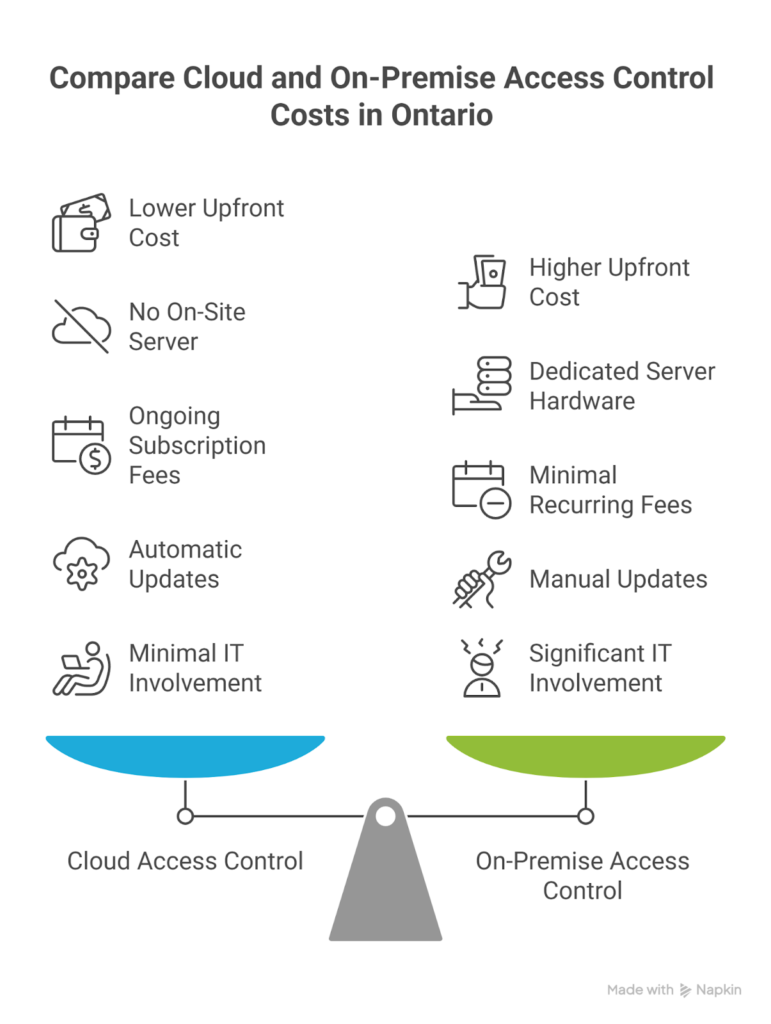
When comparing a cloud vs on premise access control cost comparison, the real difference is not just price per door. Ontario businesses must evaluate hardware investment, subscription structure, IT responsibility, and long-term ownership cost. A Toronto condo in M5V will have different financial priorities than a Mississauga warehouse in L5T. Understanding the full cost picture over five years helps avoid surprises.
Upfront Hardware Cost
Cloud systems usually require:
- Door controllers
- Readers
- Power supply and backup battery
- Network connection
They do not require a dedicated on-site server.
On-premises systems require:
- Door controllers
- Readers
- Power supply
- Dedicated server hardware
- Rack space and backup system
Because of the server requirement, the on-premises access control installation cost is typically higher at the start.
Server Cost
Cloud systems host the database in secure remote data centres. There is no physical server to purchase or maintain on-site.
On-premises systems require:
- Server hardware purchase
- Operating system licensing
- Database setup
- Backup configuration
Server replacement may also be required every 4 to 6 years.
Subscription Fees
Cloud systems operate on a subscription model. Cloud access control monthly fees may include:
- Per door licensing
- Per user licensing
- Software hosting
- Automatic updates
On-premises systems usually do not have recurring cloud fees, but may require annual software support contracts.
Maintenance Cost
Cloud systems include automatic software updates and vendor-managed patching.
On-premises systems require:
- Manual updates
- Security patch installation
- Server health monitoring
- Backup testing
Maintenance responsibility directly affects operational cost.
IT Labor Cost
For cloud systems, IT involvement is minimal. Most configurations can be done through a secure dashboard.
For on-premises systems, internal IT must:
- Maintain server uptime
- Manage firewall rules
- Monitor database backups
- Respond to hardware failures
In Ontario, for businesses without dedicated IT teams, this labor cost can become significant.
Five-Year Cost Example in Ontario
Below is a simplified comparison of two common scenarios.
| Cost Category | 10 Door Condo in Toronto (M5V) | 30 Door Warehouse in Mississauga (L5T) |
| Cloud Upfront Cost | Moderate hardware cost, no server purchase | Moderate hardware cost, scalable without a local server |
| On-Premise Upfront Cost | Higher due to server installation | Higher due to the server and infrastructure |
| Cloud Monthly Fees | Ongoing per-door subscription | Ongoing per-door subscription increases with door count |
| On-Premise Monthly Fees | Minimal, possible support contract | Minimal, but higher IT management burden |
| 5 Year Outlook Cloud | Predictable operational expense | Predictable but higher subscription total |
| 5 Year Outlook On-Premise | Higher initial capital expense, but no recurring cloud fee | Higher capital plus IT labor over time |
For smaller properties such as a 10-door Toronto condo building, cloud systems often provide predictable budgeting with lower initial investment.
For larger industrial sites such as a 30-door warehouse in Mississauga, the decision depends on whether the business prefers subscription-based operational expense or upfront capital investment with internal IT management.
The true cost difference between cloud and on-premises access control in Ontario depends on door count, IT capacity, long-term growth plans, and tolerance for monthly subscription fees.
Which Is Better for Condos, Offices, and Warehouses in Ontario?
The answer depends on how the building operates day to day. A condo corporation managing hundreds of residents does not function the same way as a warehouse running forklifts and loading docks.
When comparing cloud access control for condos in Toronto, the best access control system for a warehouse in Mississauga, or evaluating cloud vs on-premises for office building environments, the decision should match operational structure, IT capacity, and management style.
Toronto Condo Corporations (M5V, M2N)
Remote Management and Resident Control
In Downtown Toronto and North York condo towers, property managers often oversee multiple buildings. Resident turnover, contractor access, and visitor entry change frequently.
Cloud-based systems offer:
- Remote resident onboarding
- Instant credential activation or revocation
- Real-time access logs for disputes
- Mobile credential options for convenience
- Centralized dashboard for multi-building oversight
For condo boards that do not maintain full time IT staff, cloud platforms reduce technical burden while improving response speed.
On-premises systems can work in condos, but they require someone to manage the server, updates, and database backups locally. For most urban condo corporations, remote flexibility becomes a major advantage.
Vaughan Office Buildings (L4K)
HR Integration and Badge Systems
Corporate offices in Vaughan often integrate access control with:
- Employee ID badge printing
- Department-based permissions
- Time and attendance systems
- Visitor management software
In these environments, the choice between cloud and on premise depends on IT maturity.
Cloud systems allow HR teams to manage employee credentials through a web interface and support multi-floor office management.
On-premises systems may be preferred if the company has a structured IT department and wants tighter control over internal databases and network security.
For many mid-sized office buildings, both models can work effectively if properly configured.
Mississauga Warehouses (L5T, L4W)
Local Reliability and Industrial Setup
Industrial warehouses operate differently. Facilities in Mississauga logistics zones often run extended hours with shift-based access control.
Key priorities include:
- Reliable door authentication
- Durable hardware for loading docks
- Stable local network performance
- Limited downtime risk
An on-premises access control system for warehouses is commonly selected where internal IT support exists, and direct server control is preferred.
Cloud systems can also work in industrial environments, especially when multi-site logistics companies need centralized management across several Ontario locations.
The best decision for warehouses depends on whether the company values subscription-based simplicity or full infrastructure ownership.
The better system depends on property type, management style, and long term operational goals within Ontario commercial environments. Condo corporations in Toronto often prioritize remote visibility and simplified resident management. Office buildings may balance IT control with HR integration needs. Warehouses in Mississauga typically focus on operational continuity and durable infrastructure.
Before choosing, businesses should evaluate internal technical capacity, expected growth, compliance requirements, and how frequently access permissions change. A decision based on daily operational reality will always deliver better long-term performance than one based only on initial cost.
Is Cloud Access Control Better for Multi-Location Businesses?
For growing companies, especially those operating across the GTA, the question is practical: is cloud access control for multi-site business Ontario operations easier to manage than a local server model?
In many cases, the answer depends on how centralized the organization wants control to be.
Central Dashboard Management
Cloud systems provide a single secure dashboard where administrators can:
- View all doors across multiple properties
- Monitor real-time access activity
- Adjust role-based permissions
- Generate audit reports across sites
A retail chain with locations in Toronto, Vaughan, and Mississauga can manage every storefront from one login. Condo management firms handling several towers in North York and Downtown Toronto can issue credentials without visiting each building.
This centralized structure reduces travel, speeds up onboarding, and simplifies compliance reporting.
Adding Users Remotely
With cloud systems, new employees or residents can be added instantly. Access levels can be assigned by department, building, or time schedule from anywhere.
For logistics companies operating warehouses in Brampton and Mississauga, this means shift workers can be activated without waiting for local server access or IT scheduling.
In contrast, on-premises systems often require secure remote access through VPN configuration. While VPN solutions work, they introduce extra network setup and IT oversight. Remote management is possible, but it is more complex and dependent on firewall rules and server access permissions.
For organizations expanding across Ontario, cloud platforms generally provide smoother multi-property control.
If you are evaluating centralized access management alongside video monitoring, this decision also impacts how easily you can connect systems such as CCTV video surveillance integration and broader commercial security system planning in Toronto.
When Does On-Premise Access Control Make More Sense?
Despite the flexibility of cloud systems, there are situations where businesses ask when to choose on-premises access control instead.
Strong Internal IT Team
If a company has a dedicated IT department that manages servers, firewalls, and cybersecurity policies, on-premises systems can fit naturally intothe existing infrastructure naturally. Large manufacturing facilities in Vaughan or industrial plants in Mississauga often already operate secure internal networks.
With skilled IT oversight, local servers can be maintained, patched, and backed up effectively.
Data Sensitivity Concerns
Certain industries place high importance on keeping databases physically inside the building. Financial offices, research facilities, and some regulated sectors may prefer direct database control.
Although cloud systems use strong encryption and secure data centres, internal policy may require local storage.
No Subscription Model Preference
Some Ontario businesses prefer capital investment over recurring subscription fees. On-premises systems typically involve a higher upfront cost but fewer ongoing cloud licensing payments.
For companies planning long-term stable operations without expansion, this model can align better with a budgeting strategy.
Limited Internet Reliability
In areas where internet reliability is inconsistent, organizations may prefer local server operation. Industrial zones on the edge of urban centres sometimes prioritize LAN stability over internet dependency.
On-premises systems operate primarily on the internal network, reducing reliance on external connectivity for daily authentication.
Can You Switch From On Premise to Cloud Access Control Later?
Businesses often start with a local server system and later consider an upgrade from on premise to cloud access control. The good news is that migration is possible in many cases, but it requires planning.
Hybrid Systems
Some manufacturers now offer hybrid models where local controllers remain in place while management software transitions to a cloud interface. This allows gradual adoption without full system replacement.
Reader Compatibility
Before upgrading, it is important to check whether existing door readers support cloud-compatible controllers. Many modern readers using encrypted smart credentials can be reused, reducing hardware cost.
Older proximity readers may require replacement depending on the system architecture.
Migration Planning
A structured migration plan includes:
- Backing up the current user database
- Mapping access levels
- Testing controller communication
- Scheduling phased cutover
Downtime can be minimized when properly planned.
Hardware Reuse
In many Ontario commercial buildings, door hardware such as electric strikes, magnetic locks, and cabling can remain unchanged. The primary upgrade often involves controllers and software layers.
This is why early system design decisions matter. When systems are installed with future scalability in mind, transitions between hosting models become far smoother.
Before making changes, organizations should assess network readiness, controller age, and integration requirements with related infrastructure, such as access control system installation in Toronto and broader building security planning.
Final Thoughts
Choosing between cloud vs on premise access control is not about following trends. It is about aligning your security system with how your building actually operates. Toronto condo corporations often benefit from remote management and centralized dashboards.
Vaughan office buildings may balance IT control with flexibility. Mississauga warehouses typically focus on reliability, durability, and stable network performance.
Both models can deliver strong security, encrypted credentials, and detailed audit trails when properly installed and configured. The difference lies in cost structure, IT responsibility, scalability, and long-term control.
At Sense Group, we help Ontario businesses evaluate both options clearly before installation. We design and install commercial access control systems across Toronto, Mississauga, Vaughan, Brampton, and surrounding GTA areas.
Whether you need a cloud-based platform, a local server setup, or a hybrid solution, our team plans the system around your property type, infrastructure, and future growth.
If you are upgrading or planning a new installation, a proper site assessment is the first step toward a secure and scalable access control solution.