Understanding managed IT services vs break-fix IT support helps Toronto businesses choose between reactive repairs and proactive technology management.

Break-fix IT support means you call a technician only after something breaks, and you pay for that single visit or repair. Managed IT services flip that model: you pay a predictable monthly fee for a provider to monitor, maintain, and secure your systems continuously, catching problems before they cause downtime. The core difference is reactive versus proactive — and that difference shapes cost, risk, and how much you can plan around your technology.
For Toronto businesses juggling office networks, cloud tools, and physical security systems like security cameras installation across Toronto locations, the choice between these two models affects far more than just IT budgets — it affects how resilient the whole operation is.
managed IT services vs break-fix IT support
Break-fix is the oldest model in IT support. A vendor shows up, diagnoses the problem, fixes it, invoices you, and leaves. There’s no ongoing relationship, no monitoring, and no responsibility for what happens between visits.
This works fine for very small operations with minimal technology dependence — a single office with a few computers and no critical uptime requirements. But it has real weaknesses:
- No prevention. Nobody is watching your servers, backups, or network for warning signs. The first sign of trouble is usually the outage itself.
- Unpredictable costs. A bad month can mean multiple emergency call-outs, after-hours rates, and rush parts.
- Slower response. Break-fix vendors prioritize whoever pays fastest or shouts loudest, not necessarily your business.
- No accountability for outcomes. The vendor gets paid whether the fix holds or the same issue recurs next month.
Break-fix support treats IT like a plumbing repair — necessary when things go wrong, but never addressing why they keep going wrong.
The Managed IT Services Model: Ongoing Support and Prevention
Managed IT services replace the “call when broken” approach with continuous oversight. A managed services provider (MSP) monitors your network, servers, and endpoints around the clock, applies patches and updates before vulnerabilities are exploited, manages backups, and handles help desk requests as part of a flat monthly fee.
The relationship is structured around uptime and prevention rather than repair volume. Typical inclusions are:
- 24/7 network and system monitoring
- Regular patching and software updates
- Managed backups and disaster recovery planning
- Cybersecurity tools like endpoint protection and firewall management
- A help desk for day-to-day user issues
- Strategic IT planning tied to business goals, not just tickets
Because the provider’s revenue isn’t tied to how often things break, incentives align differently — an MSP is financially motivated to keep your systems stable, not to bill you for firefighting.
managed IT services vs break-fix IT support
Cost Comparison: Which One Actually Costs Less Over Time
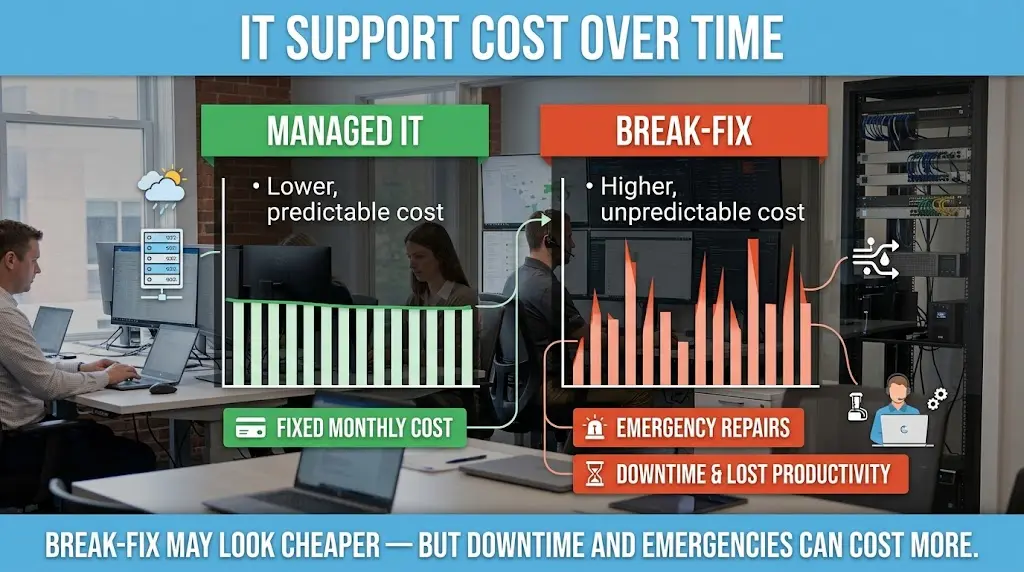
On paper, break-fix looks cheaper because there’s no recurring bill. In practice, the total cost of ownership often runs higher once you factor in downtime, emergency rates, and lost productivity.
A single afternoon of network downtime can cost a small Toronto business far more in lost billable hours than a month of managed services would. Break-fix invoices also spike unpredictably — a server failure, a ransomware incident, or a hardware replacement can all land in the same quarter with no warning.
Managed IT services convert that unpredictability into a flat, budgetable line item. You know what you’re paying each month, and a large share of potential emergencies are prevented before they happen rather than billed after the fact.
Security Implications: Why Reactive IT Puts Toronto Businesses at Risk
Cybersecurity is where the gap between the two models widens the most. Break-fix support has no reason to proactively patch software, monitor for intrusions, or review firewall rules — those are ongoing tasks, not one-off repairs. That leaves gaps that attackers actively look for.
Managed IT services build security into daily operations: continuous monitoring, timely patching, and incident response plans that exist before an incident occurs. This matters just as much for physical security infrastructure as it does for networks. If your business relies on connected cameras or access control systems, those devices need the same ongoing attention as your servers — firmware updates, network segmentation, and monitoring for tampering or outages.
That’s a common blind spot: businesses secure their servers but leave camera systems unmanaged. Understanding ai security cameras and how smart detection actually works helps clarify why these devices need the same proactive oversight as any other networked system, not a “set it and forget it” installation.
Where Physical Security Fits Into a Managed IT Strategy
Managed IT and physical security overlap more than most businesses realize. Cameras, access control panels, and alarm systems today run on the same network infrastructure as computers and servers — which means they carry similar risks if left unmonitored.
A few practical considerations that come up often when Toronto businesses plan out camera coverage:
- Coverage distance varies by camera type and lens, which is why it’s worth reviewing how many meters a CCTV camera can cover before finalizing placement.
- Audio recording rules differ by province and by device, so it’s worth confirming details with Sense Group’s answer on audio recording before installation, since privacy compliance matters as much as coverage.
Treating cameras as part of your managed IT environment — not a separate system installed once and ignored — keeps both your network and your physical premises protected under one consistent standard.
Connectivity and Network Capacity Also Factor In
Managed IT isn’t only about servers and cameras; it also covers the connectivity backbone everything runs on. Businesses adding more cameras, point-of-sale devices, or staff laptops eventually run into a practical limit: how many devices a single access point can reliably handle before performance drops. An MSP accounts for this during planning rather than discovering it after the network slows down.
Connectivity choices matter too. Some businesses outside dense urban cores are now weighing satellite internet as a backup or primary connection, and it’s worth understanding the cost of installing Starlink in Ontario before treating it as a fallback option, since pricing and setup requirements differ from traditional business internet.
When comparing managed IT services vs break-fix IT support, the right choice depends on how much downtime, security risk, and unpredictable spending your business can tolerate.
Which Model Is Right for Your Business
Break-fix can still make sense for very small operations with minimal technology dependence and no regulatory or client obligations around uptime and data protection. But for most growing Toronto businesses — especially those handling client data, running e-commerce, or relying on connected security systems — managed IT services offer more predictable costs, stronger security posture, and far less downtime risk.
The real question isn’t which model is objectively better in every case; it’s whether your business can tolerate unplanned outages and reactive fixes, or whether continuity and prevention are worth a predictable monthly investment.
FAQ
Can I switch from break-fix to managed IT services without disrupting operations?
Yes. Most providers start with an assessment of your current systems, then migrate monitoring and maintenance over gradually — usually without any noticeable downtime for staff.
Do managed IT services replace the need for an in-house IT person?
Not always. Many businesses keep a small internal IT contact for day-to-day coordination while an MSP handles monitoring, security, and infrastructure management in the background.
Does managed IT support cover security cameras and access control systems?
It can, when those systems are network-connected. Cameras, access panels, and alarms benefit from the same monitoring and patching approach as computers, since they’re increasingly part of the same IT environment rather than standalone hardware.