These cold weather maintenance tips for Security cameras in Barrie and Orillia Homeowners help homeowners prepare their outdoor camera systems for snow, ice, and extreme temperatures.

Winter in Barrie and Orillia means lake-effect snow squalls, deep freezes, and temperature swings that can knock a security system offline right when you need it most. The short answer: keep lenses and housings clear of snow and ice, check seals for condensation, protect cabling and power supplies from extreme cold, and confirm your network connection holds up during storms. The details below explain how to do each of these properly before the next system pulls through.
cold weather maintenance tips for Security camera in Barrie and Orillia Homeowners
Simcoe County’s climate isn’t just cold — it’s volatile. A camera that performed flawlessly in October can struggle by January because of a combination of factors: moisture that freezes and thaws repeatedly inside housings, snow accumulation that blocks the lens or shifts the mounting angle, and battery-powered devices losing capacity in sub-zero temperatures. None of this means your system is defective. It means outdoor electronics near Georgian Bay need a maintenance routine built around the season, not a one-size-fits-all setup.
A properly installed system from the start makes this season far less stressful. Mounts positioned with the right downward angle and overhang shed snow more easily, and enclosures rated for Canadian winters resist cracking when the temperature swings 20 degrees in a day. If your current setup wasn’t installed with local conditions in mind, it’s worth having it reviewed as part of Security Cameras Installation from Sense Group.
Condensation and Ice Inside the Housing
One of the most common cold-weather complaints isn’t the camera failing outright — it’s fogged or frozen lenses. This happens when warm, moist air inside a housing meets a cold outer shell, condenses, and then freezes overnight. A few habits reduce this significantly:
- Check that housing seals and gaskets are intact; a cracked seal lets in the humid air that causes fogging.
- Avoid mounting cameras where heat from a nearby vent or window escapes directly onto the unit, since that temperature clash accelerates condensation.
- Wipe down lenses with a microfiber cloth during regular checks rather than waiting until visibility is already compromised.
If fogging happens repeatedly on the same camera, it’s usually a sign the housing seal has failed and needs replacing rather than something you can fix with wiping alone.
Snow Buildup and Coverage Loss
Even a light dusting on a lens can blind a camera, and heavier snowfall can bury a low-mounted unit entirely. Beyond the lens itself, snow changes how far and how clearly a camera can actually see — a factor many homeowners don’t think about until a storm rolls through. If you’re unsure how much distance your current cameras are designed to cover in good conditions, versus what to expect once visibility drops, it helps to read this guide before assuming a camera is faulty.
Practical steps that help through winter:
- Angle cameras slightly downward so snow slides off rather than collecting on top of the lens.
- Install a small overhang or use a housing with a built-in hood.
- After major snowfalls, do a quick visual check from the ground rather than assuming the system is working normally.
Smart Detection Features Can Struggle in Snow
If your system relies on motion or person detection to reduce false alerts, know that heavy snowfall and wind-blown flakes can confuse these algorithms, sometimes triggering nuisance notifications or, less often, missing real activity behind a curtain of snow. This isn’t unique to any one brand — it’s a known limitation of how visual analytics work in low-visibility conditions. For a deeper look at how these systems actually process what they see, our post on what smart detection is doing behind the scenes breaks down the technology in plain terms so you know what to expect from your own setup this winter.
Video Doorbells Need Their Own Winter Checklist
Doorbell cameras take a particular beating in Ontario winters because they’re mounted at eye level, exposed to direct wind, and often the first thing to ice over during freezing rain. Battery-powered doorbells also lose charge faster in the cold, which can mean more frequent recharging cycles or missed doorbell presses during a cold snap. If you’re installing or replacing a unit this season, it’s worth understanding video doorbell winter installation considerations specific to cold climates — from mounting angle to power source — before you commit to a spot on the door frame.
Audio Pickup and Cold-Weather Enclosures
Homeowners sometimes assume a camera’s microphone stops working when temperatures drop, but more often it’s wind noise or an iced-over housing muffling sound rather than a hardware failure. If audio matters to your setup — for verifying a delivery conversation or catching a porch-pirate exchange — it’s worth understanding how audio recording works on these systems generally, separate from any winter-specific interference, so you can tell the difference between a real fault and a seasonal quirk.
Cabling, Power Supplies, and PoE Connections
Extreme cold makes cable jackets more brittle, and any cabling routed through unheated spaces like attics, soffits, or exterior walls should be checked annually for cracking or pinched runs where ice has built up. For wired, Power over Ethernet (PoE) camera systems, the quality of the cabling itself matters more than most homeowners realize — thinner or lower-grade cable can lose more power over distance, which becomes more noticeable when connectors contract in the cold. If you’re planning a new install or expanding an existing system, comparing cabling standards with Sense Group’s breakdown of Cat6 versus Cat6a cabling is a useful reference even for a home network, since the same principles about signal integrity and future-proofing apply.
Keeping Your Network Connection Stable Through Storms
A camera system is only as reliable as the network behind it, and winter storms are exactly when internet outages tend to spike — from ice on utility lines to router power interruptions. This is also when the difference between reactive troubleshooting and proactive monitoring shows up most clearly; our comparison of managed IT support versus a break-fix approach explains why catching a weak connection before a storm hits beats scrambling to fix it after your cameras go dark.
For properties in more rural stretches around Orillia and outlying Barrie where cable or DSL service is unreliable, satellite internet has become a practical backup for keeping security systems online. If that’s a route you’re considering, it’s worth reviewing what Starlink installation runs for a typical Ontario property before winter storm season narrows your options.
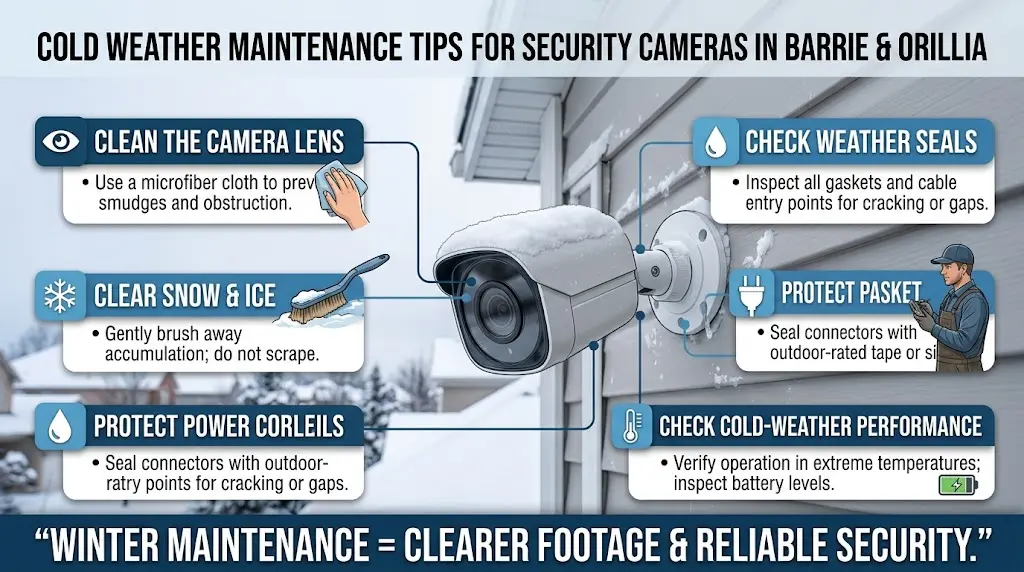
A Simple Winter Maintenance Checklist
Run through this list once before the first hard freeze and again mid-winter:
- Inspect all housings and seals for cracks or moisture.
- Clear lenses of frost, snow, and condensation.
- Confirm mounting angles still shed snow rather than collect it.
- Check battery levels on wireless cameras and doorbells more frequently.
- Inspect exposed cabling for brittleness or ice damage.
- Test your network connection and backup power during a simulated outage.
- Review recorded footage quality after the first big snowfall to catch issues early.
Following cold weather maintenance tips for Security camera in Barrie and Orillia Homeowners throughout the season can help catch small problems before snow, ice, or prolonged freezing temperatures affect system reliability.
When to Call a Professional
Some winter issues are simple fixes — a wipe-down, a battery swap, a slight angle adjustment. Others, like a persistent internal fog, a failing PoE connection, or a camera that’s stopped recording reliably during storms, usually point to a hardware or wiring problem that’s easier to diagnose with the right tools. If your system has needed repeated attention this season, it may be time for a full inspection rather than another patch fix.
For professional help with inspections, installation, or winter-related camera issues, you can also find Sense Group on Google Maps for business and location details.
FAQ
Do security cameras stop working in extreme cold?
Most outdoor-rated cameras are built to operate well below freezing, but extreme cold can shorten battery life, stiffen cables, and cause condensation to freeze inside poorly sealed housings. A camera “failing” in winter is usually a seal, power, or mounting issue rather than the camera itself being incompatible with the climate.
How often should I check my cameras during winter?
A quick visual check after any significant snowfall or ice storm is enough for most households, with a more thorough inspection of seals, cabling, and battery levels once or twice over the season.
Can snow trigger false motion alerts?
Yes. Wind-blown snow and sudden temperature-related lens fogging can both trigger motion alerts on systems that rely on basic motion detection, though smarter person-detection features tend to filter out more of this noise.