
This guide to AI security cameras with smart detection in Hamilton explains what smart detection actually does and how it can reduce false alerts for homeowners.
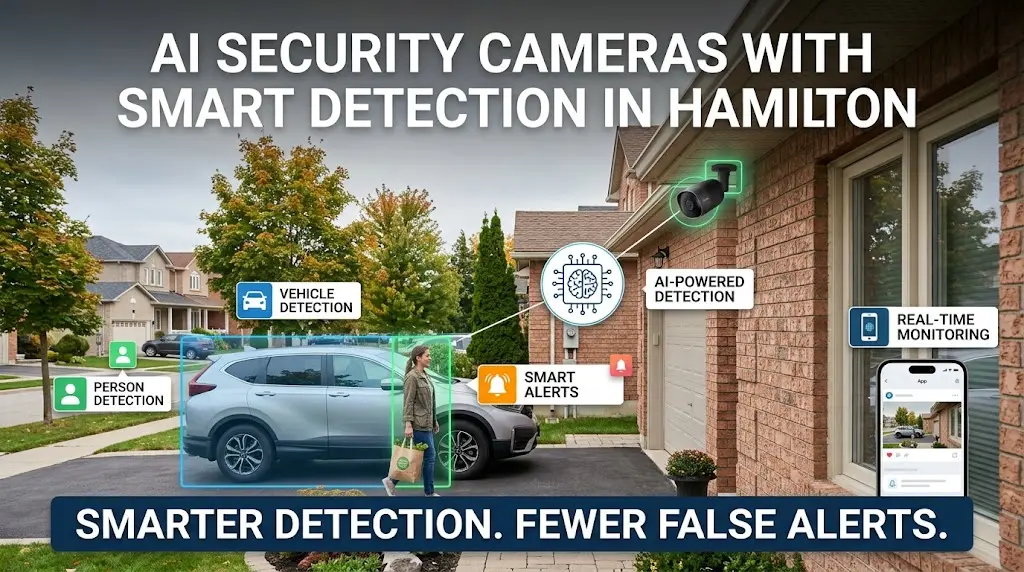
AI security cameras use on-device or cloud-based algorithms to tell the difference between a person, a vehicle, an animal, or a moving tree branch before sending you an alert. This is what separates them from older motion-only cameras, which trigger on any change in pixels — including a passing cloud or a raccoon at 2 a.m. In practice, “smart detection” means fewer useless notifications and faster, more accurate alerts when something actually matters at your door, driveway, or backyard.
AI security cameras with smart detection in Hamilton
The term gets used loosely in retail marketing, so it’s worth being precise. A genuinely AI-driven camera runs object classification models that categorize movement into defined groups — usually person, vehicle, animal, and sometimes package. Some higher-end systems go further, recognizing familiar faces or license plates, or learning the difference between your car pulling in and a stranger’s.
This is different from basic motion detection, which just compares frame-to-frame pixel changes and fires an alert regardless of what caused them. Basic motion cameras are cheap and simple, but in a typical Hamilton or Toronto neighbourhood with wind, streetlights, shadows, and traffic, they generate dozens of false alerts a day. AI classification filters most of that noise out before it ever reaches your phone.
The Smart Detection Features That Actually Matter
Not every “AI feature” listed on a camera box adds real value. A few genuinely change day-to-day usability:
- Person and vehicle detection — the baseline that cuts false alerts dramatically compared to generic motion sensing.
- Zone-based alerts — you draw a boundary (a driveway, a gate, a walkway) so the camera only flags activity where it’s relevant, ignoring the sidewalk or the neighbour’s yard.
- Package detection — useful for front-door cameras, flagging when an object is dropped and stays stationary.
- Line-crossing detection — triggers only when someone crosses a defined line rather than simply appearing in frame, helpful for driveways and fence lines.
- Loitering alerts — flags a person standing in one spot for longer than expected, which matters more for a storefront or side entrance than casual foot traffic.
For most homes, person/vehicle detection with zone alerts covers 90% of the practical benefit. The rest are nice-to-haves depending on layout.
For homeowners considering AI security cameras with smart detection in Hamilton, smart features work best when camera placement, lighting, and coverage are planned properly.
Coverage and Placement Still Decide Whether AI Detection Works
Smart algorithms can’t compensate for a camera that’s aimed wrong, mounted too high, or too far from the action to classify anything clearly. AI detection accuracy drops sharply once a person or vehicle is small in frame or poorly lit, which is a placement problem, not a software problem. This is exactly why coverage distance and mounting angle come before feature lists in any real installation plan — see Sense Group’s breakdown of camera coverage range for how distance, lens type, and lighting affect what a camera can actually resolve.
For a typical Hamilton or Toronto property, that usually means one camera covering the driveway approach, one on the front entry at head height, and rear coverage sized to the yard depth — not a single wide-angle unit trying to do everything from one corner of the house.
Audio, Privacy, and What Gets Recorded
AI object detection is about video classification, but many homeowners also want to know what their system captures on the audio side, especially with two-way talk features becoming standard on doorbell and outdoor cameras. If that’s part of your decision, it’s worth understanding whether a CCTV camera also records voice alongside video, since audio recording carries separate consent and privacy considerations in Ontario compared to video alone. Getting this right matters both legally and for how comfortable you and your neighbours feel about the system.
Getting the Installation Right in a Toronto-Area Home
AI features only perform as advertised when the underlying setup — power, network bandwidth, camera height, and lens angle — is done properly. A camera streaming 4K with AI processing needs stable local network throughput, particularly if you’re running several cameras plus a doorbell unit on one router. Poor Wi-Fi or an underpowered PoE switch causes dropped clips and delayed alerts long before the AI model itself is the bottleneck.
This is where professional setup pays off over a DIY box kit. When we’re installing security cameras across Toronto properties, we plan camera count and placement around the property’s actual layout — sightlines, lighting, distance to the router — rather than just mounting units where a bracket happens to fit. That planning step is what determines whether smart detection performs the way the spec sheet promises.
For professional help planning the right setup, you can also find Sense Group on Google Maps for business and location details.
Beyond the Camera: The Network Behind a Smart Security Setup
AI cameras don’t operate in isolation — they depend on the same home network carrying your internet, smart devices, and Wi-Fi. If you’re adding several cameras to a household that already runs smart locks, thermostats, and multiple phones and laptops, it’s worth checking how many devices per access point your current router can realistically handle before load becomes a problem.
For larger properties or anyone running a home office alongside a camera system, cable quality behind the walls matters too. If you’re wiring a new space or upgrading, the choice of cat6 vs cat6a office network cabling affects how much bandwidth headroom you have as camera counts and resolution grow. And for properties in areas with unreliable cable or fibre service, some homeowners pair their camera system with satellite internet — in which case Sense Group’s Starlink installation pricing guide for Ontario is a useful reference before budgeting the full setup.
Is AI Detection Worth the Extra Cost?
For most households, yes — the practical difference is fewer false alerts and faster recognition of real events, which is the entire point of having cameras in the first place. A system that pings you every time a cat crosses the driveway trains you to ignore notifications altogether, which defeats the purpose of the camera. Paying for genuine person/vehicle classification, even on a modest 2–4 camera setup, tends to matter more for day-to-day usability than resolution upgrades or extra camera count.
That said, AI detection is only as good as the hardware and network behind it. A budget camera with a weak processor may claim AI features but classify slowly or inaccurately in low light — something worth testing or asking about directly before buying, rather than trusting the box copy alone.
FAQ
Do AI security cameras need the internet to work?
Most AI cameras process detection locally on the device or a hub, but they still need internet access to send you push notifications and store or stream footage remotely. Without the internet, local recording may still work depending on the camera, but you won’t get real-time alerts on your phone.
Can AI cameras tell the difference between my car and a stranger’s?
Some higher-end systems support vehicle recognition tied to specific plates or shapes, but most standard AI cameras only classify “vehicle” generically rather than identifying whose vehicle it is. If distinguishing your own car from visitors’ matters, that’s a feature to confirm before buying rather than assuming.
Will AI detection eliminate false alerts completely?
No system eliminates false alerts entirely, but well-configured zone-based AI detection reduces them dramatically compared to basic motion sensing. Fine-tuning zones and sensitivity after installation typically cuts remaining false alerts even further.